Code
source("../dsan-globals/_globals.r")
set.seed(5300)DSAN 5300: Statistical Learning
Spring 2026, Georgetown University
Today’s Planned Schedule:
| Start | End | Topic | |
|---|---|---|---|
| Lecture | 6:30pm | 7:10pm | Simple Linear Regression → |
| 7:10pm | 7:30pm | Deriving the OLS Solution → | |
| 7:30pm | 8:00pm | Interpreting OLS Output → | |
| Break! | 8:00pm | 8:10pm | |
| 8:10pm | 8:30pm | Quiz Review → | |
| 8:30pm | 9:00pm | Quiz 2! |
What happens to my dependent variable \(Y\) when my independent variable \(X\) increases by 1 unit?
Keep the goal in front of your mind:
source("../dsan-globals/_globals.r")
set.seed(5300)\[ \DeclareMathOperator*{\argmax}{argmax} \DeclareMathOperator*{\argmin}{argmin} \newcommand{\bigexp}[1]{\exp\mkern-4mu\left[ #1 \right]} \newcommand{\bigexpect}[1]{\mathbb{E}\mkern-4mu \left[ #1 \right]} \newcommand{\definedas}{\overset{\small\text{def}}{=}} \newcommand{\definedalign}{\overset{\phantom{\text{defn}}}{=}} \newcommand{\eqeventual}{\overset{\text{eventually}}{=}} \newcommand{\Err}{\text{Err}} \newcommand{\expect}[1]{\mathbb{E}[#1]} \newcommand{\expectsq}[1]{\mathbb{E}^2[#1]} \newcommand{\fw}[1]{\texttt{#1}} \newcommand{\given}{\mid} \newcommand{\green}[1]{\color{green}{#1}} \newcommand{\heads}{\outcome{heads}} \newcommand{\iid}{\overset{\text{\small{iid}}}{\sim}} \newcommand{\lik}{\mathcal{L}} \newcommand{\loglik}{\ell} \DeclareMathOperator*{\maximize}{maximize} \DeclareMathOperator*{\minimize}{minimize} \newcommand{\mle}{\textsf{ML}} \newcommand{\nimplies}{\;\not\!\!\!\!\implies} \newcommand{\orange}[1]{\color{orange}{#1}} \newcommand{\outcome}[1]{\textsf{#1}} \newcommand{\param}[1]{{\color{purple} #1}} \newcommand{\pgsamplespace}{\{\green{1},\green{2},\green{3},\purp{4},\purp{5},\purp{6}\}} \newcommand{\pedge}[2]{\require{enclose}\enclose{circle}{~{#1}~} \rightarrow \; \enclose{circle}{\kern.01em {#2}~\kern.01em}} \newcommand{\pnode}[1]{\require{enclose}\enclose{circle}{\kern.1em {#1} \kern.1em}} \newcommand{\ponode}[1]{\require{enclose}\enclose{box}[background=lightgray]{{#1}}} \newcommand{\pnodesp}[1]{\require{enclose}\enclose{circle}{~{#1}~}} \newcommand{\purp}[1]{\color{purple}{#1}} \newcommand{\sign}{\text{Sign}} \newcommand{\spacecap}{\; \cap \;} \newcommand{\spacewedge}{\; \wedge \;} \newcommand{\tails}{\outcome{tails}} \newcommand{\Var}[1]{\text{Var}[#1]} \newcommand{\bigVar}[1]{\text{Var}\mkern-4mu \left[ #1 \right]} \]
library(tidyverse)
set.seed(5321)
N <- 11
x <- seq(from = 0, to = 1, by = 1 / (N - 1))
y <- x + rnorm(N, 0, 0.2)
mean_y <- mean(y)
spread <- y - mean_y
df <- tibble(x = x, y = y, spread = spread)
ggplot(df, aes(x=x, y=y)) +
geom_abline(slope=1, intercept=0, linetype="dashed", color=cbPalette[1], linewidth=g_linewidth*1.5) +
geom_segment(xend=(x+y)/2, yend=(x+y)/2, linewidth=g_linewidth*2, color=cbPalette[2]) +
geom_point(size=g_pointsize) +
coord_equal() +
xlim(0, 1) + ylim(0, 1) +
dsan_theme("half") +
labs(
title = "Principal Component Line"
)
ggplot(df, aes(x=x, y=y)) +
geom_abline(slope=1, intercept=0, linetype="dashed", color=cbPalette[1], linewidth=g_linewidth*1.5) +
geom_segment(xend=x, yend=x, linewidth=g_linewidth*2, color=cb_palette[3]) +
geom_point(size=g_pointsize) +
coord_equal() +
xlim(0, 1) + ylim(0, 1) +
dsan_theme("half") +
labs(
title = "Regression Line"
)
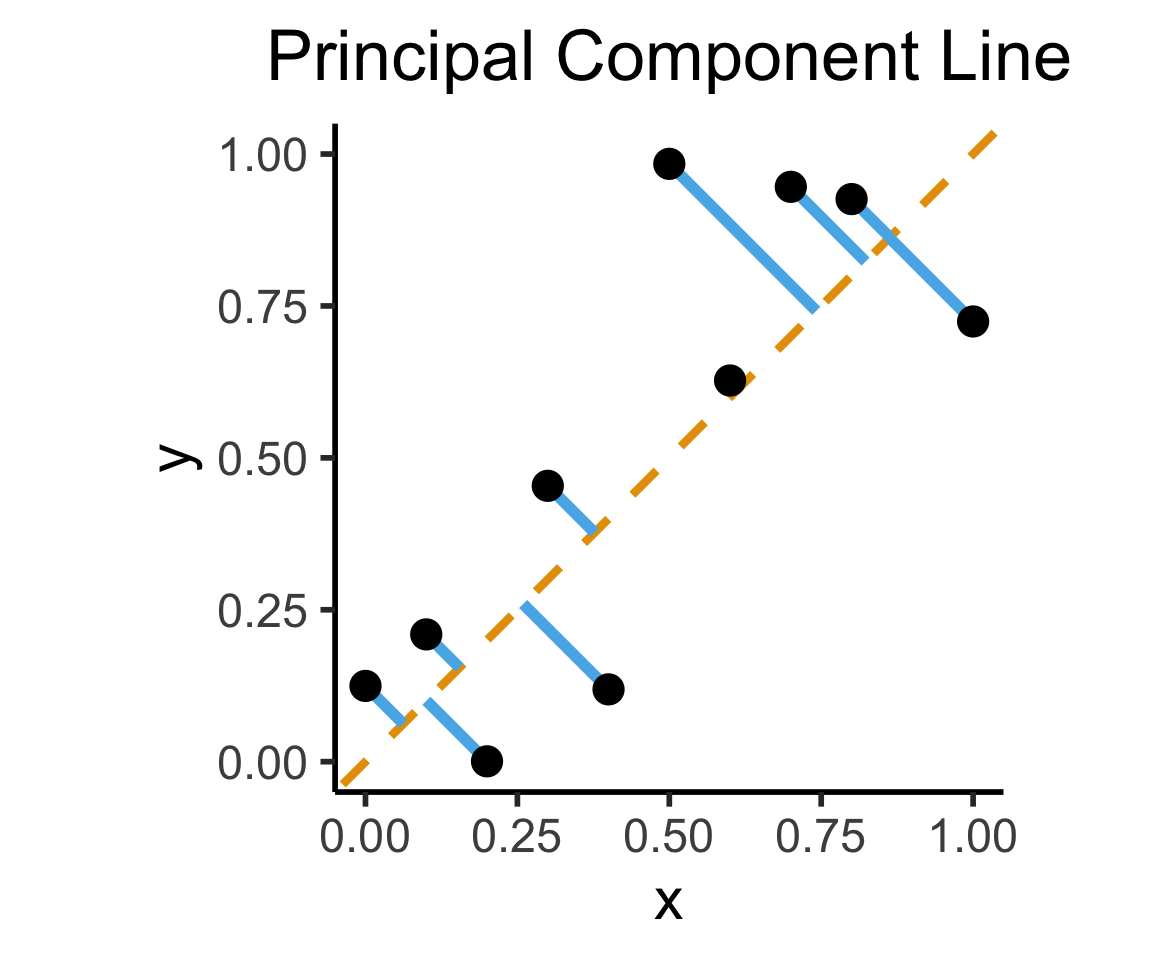
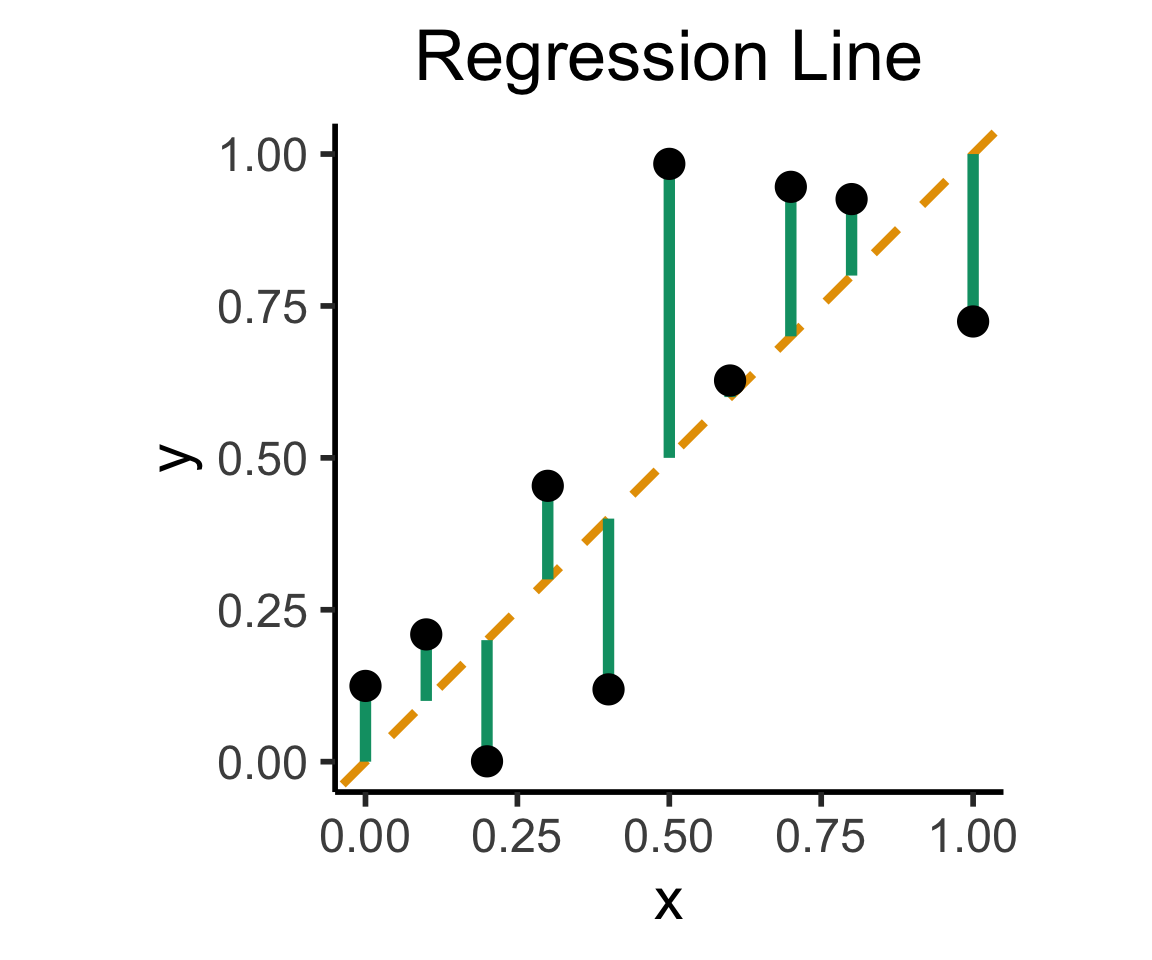
On the difference between these two lines, and why it matters, I cannot recommend Gelman and Hill (2007) enough!
library(readr)
library(ggplot2)
gdp_df <- read_csv("assets/gdp_pca.csv")
dist_to_line <- function(x0, y0, a, c) {
numer <- abs(a * x0 - y0 + c)
denom <- sqrt(a * a + 1)
return(numer / denom)
}
# Finding PCA line for industrial vs. exports
x <- gdp_df$industrial
y <- gdp_df$exports
lossFn <- function(lineParams, x0, y0) {
a <- lineParams[1]
c <- lineParams[2]
return(sum(dist_to_line(x0, y0, a, c)))
}
o <- optim(c(0, 0), lossFn, x0 = x, y0 = y)
ggplot(gdp_df, aes(x = industrial, y = exports)) +
geom_point(size=g_pointsize/2) +
geom_abline(aes(slope = o$par[1], intercept = o$par[2], color="pca"), linewidth=g_linewidth, show.legend = TRUE) +
geom_smooth(aes(color="lm"), method = "lm", se = FALSE, linewidth=g_linewidth, key_glyph = "blank") +
scale_color_manual(element_blank(), values=c("pca"=cbPalette[2],"lm"=cbPalette[1]), labels=c("Regression","PCA")) +
dsan_theme("half") +
remove_legend_title() +
labs(
title = "PCA Line vs. Regression Line",
x = "Industrial Production (% of GDP)",
y = "Exports (% of GDP)"
)
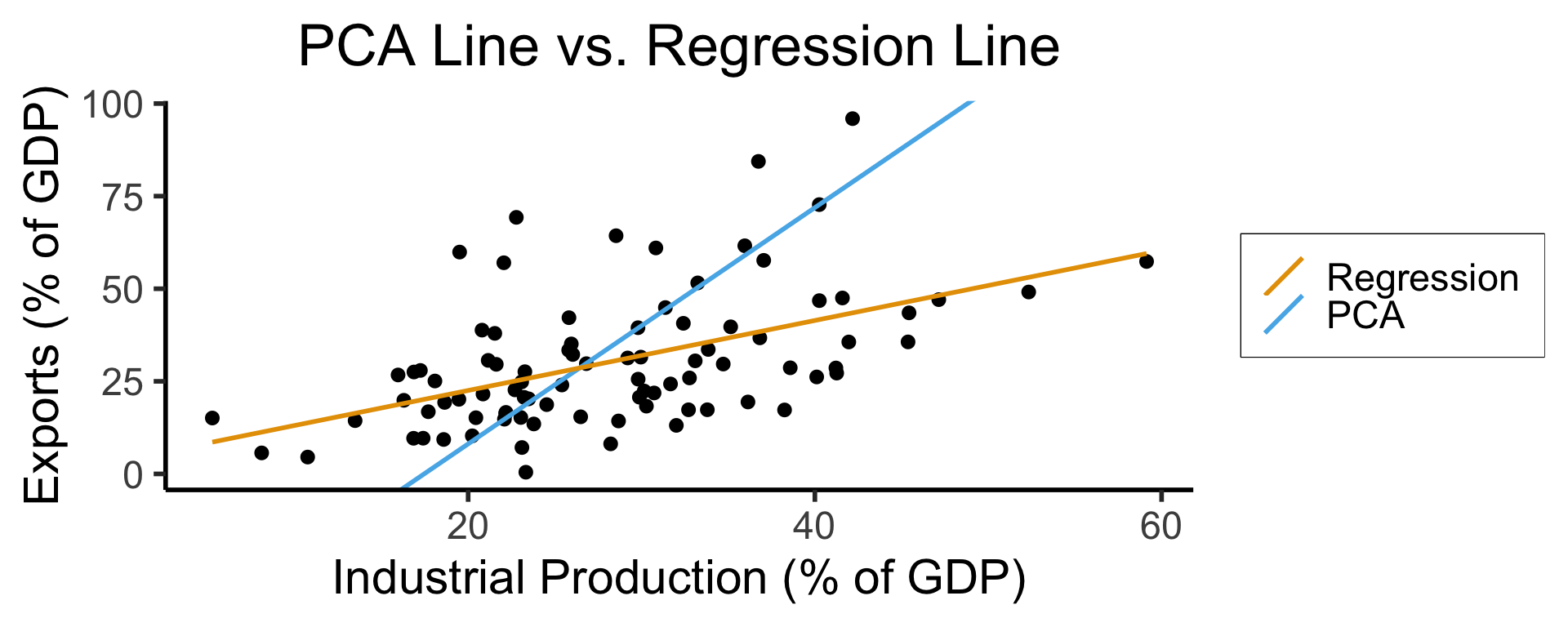
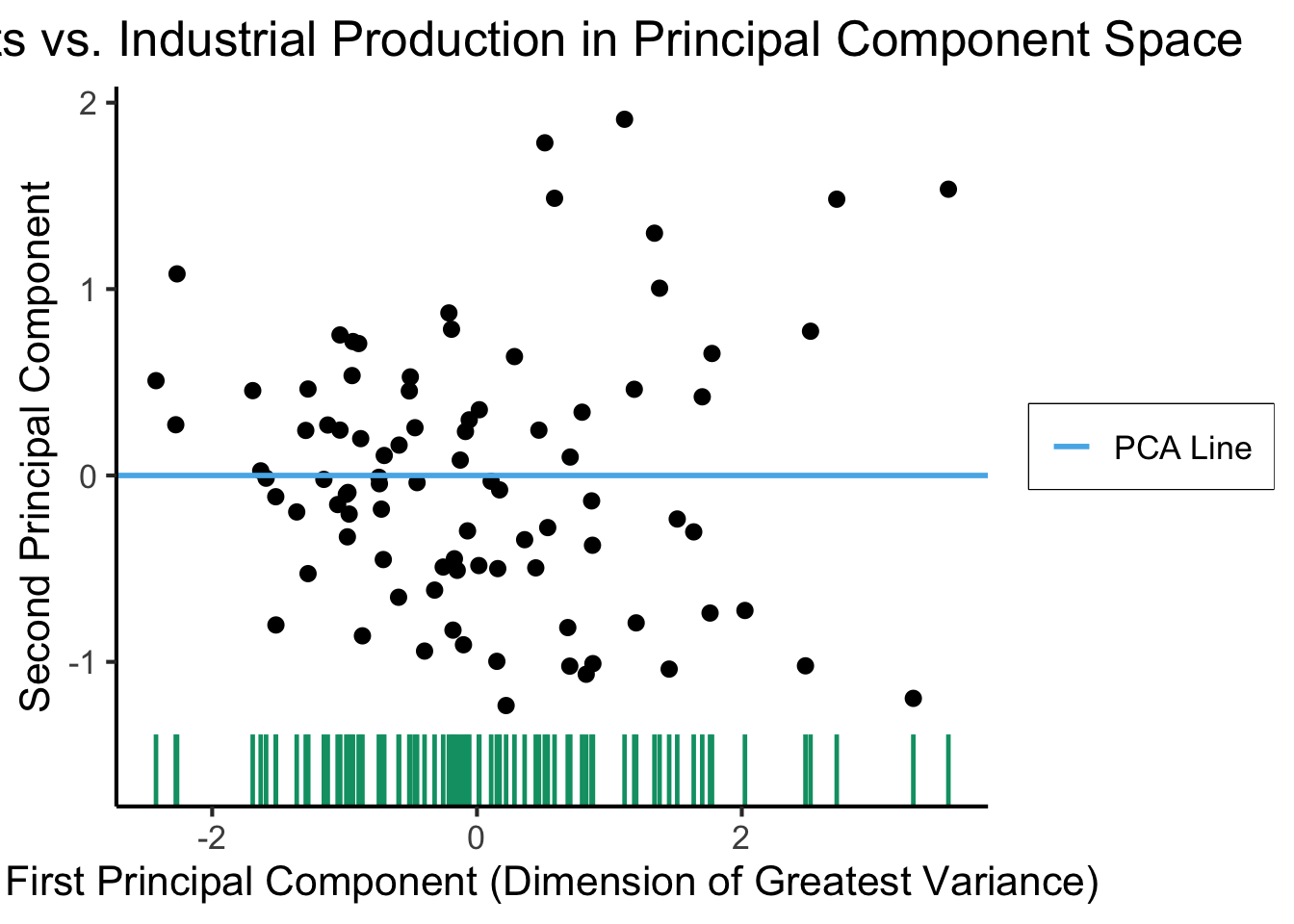
See this amazing blog post using PCA, with 2 dimensions, to explore UN voting patterns!
ggplot(gdp_df, aes(pc1, .fittedPC2)) +
geom_point(size = g_pointsize/2) +
geom_hline(aes(yintercept=0, color='PCA Line'), linetype='solid', size=g_linesize) +
geom_rug(sides = "b", linewidth=g_linewidth/1.2, length = unit(0.1, "npc"), color=cbPalette[3]) +
expand_limits(y=-1.6) +
scale_color_manual(element_blank(), values=c("PCA Line"=cbPalette[2])) +
dsan_theme("full") +
remove_legend_title() +
labs(
title = "Exports vs. Industrial Production in Principal Component Space",
x = "First Principal Component (Dimension of Greatest Variance)",
y = "Second Principal Component"
)
library(dplyr)
library(tidyr)
plot_df <- gdp_df %>% select(c(country_code, pc1, agriculture, military))
long_df <- plot_df %>% pivot_longer(!c(country_code, pc1), names_to = "var", values_to = "val")
long_df <- long_df |> mutate(
var = case_match(
var,
"agriculture" ~ "Agricultural Production",
"military" ~ "Military Spending"
)
)
ggplot(long_df, aes(x = pc1, y = val, facet = var)) +
geom_point() +
geom_smooth(method=lm, formula='y ~ x') +
facet_wrap(vars(var), scales = "free") +
dsan_theme("full") +
labs(
x = "\"Industrial-Export Dimension\" (First PC)",
y = "% of GDP"
)
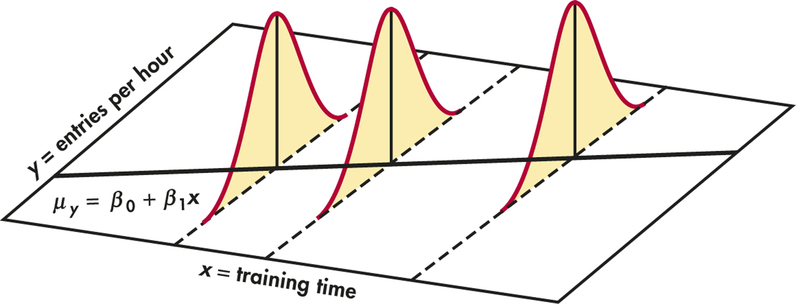
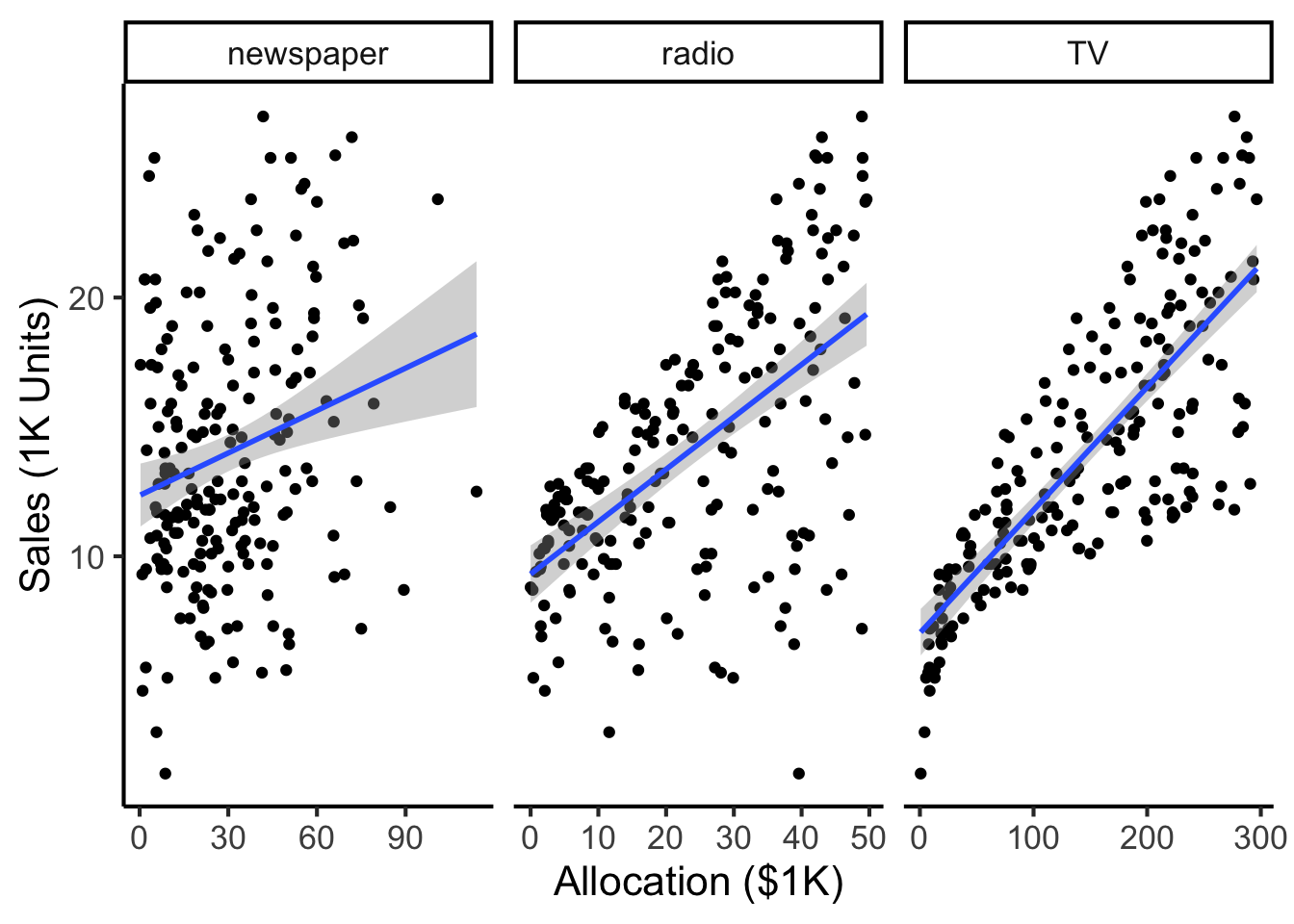
Given data \((X, Y)\), we estimate \(\widehat{y} = \widehat{\beta}_0 + \widehat{\beta}_1x\), hypothesizing that:
library(tidyverse)
ad_df <- read_csv("assets/Advertising.csv") |> rename(id=`...1`)
long_df <- ad_df |> pivot_longer(-c(id, sales), names_to="medium", values_to="allocation")
long_df |> ggplot(aes(x=allocation, y=sales)) +
geom_point() +
facet_wrap(vars(medium), scales="free_x") +
geom_smooth(method='lm', formula="y ~ x") +
theme_dsan() +
labs(
x = "Allocation ($1K)",
y = "Sales (1K Units)"
)
Our model:
\[ Y = \underbrace{\param{\beta_0}}_{\mathclap{\text{Intercept}}} + \underbrace{\param{\beta_1}}_{\mathclap{\text{Slope}}}X + \varepsilon \]
…Generates predictions via:
\[ \widehat{y} = \underbrace{\widehat{\beta}_0}_{\mathclap{\small\begin{array}{c}\text{Estimated} \\[-5mm] \text{intercept}\end{array}}} ~+~ \underbrace{\widehat{\beta}_1}_{\mathclap{\small\begin{array}{c}\text{Estimated} \\[-4mm] \text{slope}\end{array}}}\cdot x \]
\[ \widehat{\varepsilon}_i = \underbrace{y_i}_{\mathclap{\small\begin{array}{c}\text{Real} \\[-5mm] \text{label}\end{array}}} - \underbrace{\widehat{y}_i}_{\mathclap{\small\begin{array}{c}\text{Predicted} \\[-5mm] \text{label}\end{array}}} = \underbrace{y_i}_{\mathclap{\small\begin{array}{c}\text{Real} \\[-5mm] \text{label}\end{array}}} - \underbrace{ \left( \widehat{\beta}_0 + \widehat{\beta}_1 \cdot x \right) }_{\text{\small{Predicted label}}} \]
What can we optimize to ensure these residuals are as small as possible?
N <- 21
x <- seq(from = 0, to = 1, by = 1 / (N - 1))
y <- x + rnorm(N, 0, 0.25)
mean_y <- mean(y)
spread <- y - mean_y
sim_lg_df <- tibble(x = x, y = y, spread = spread)
sim_lg_df |> ggplot(aes(x=x, y=y)) +
geom_abline(slope=1, intercept=0, linetype="dashed", color=cbPalette[1], linewidth=g_linewidth) +
# geom_segment(xend=x, yend=x, linewidth=g_linewidth*2, color=cbPalette[2]) +
geom_segment(aes(xend=x, yend=x, color=ifelse(y>x,"Positive","Negative")), linewidth=1.5*g_linewidth) +
geom_point(size=g_pointsize) +
# coord_equal() +
theme_dsan("half") +
scale_color_manual("Spread", values=c("Positive"=cbPalette[3],"Negative"=cbPalette[6]), labels=c("Positive"="Positive","Negative"="Negative"))
large_sum <- sum(sim_lg_df$spread)
writeLines(fmt_decimal(large_sum))
large_sqsum <- sum((sim_lg_df$spread)^2)
writeLines(fmt_decimal(large_sqsum))
large_abssum <- sum(abs(sim_lg_df$spread))
writeLines(fmt_decimal(large_abssum))
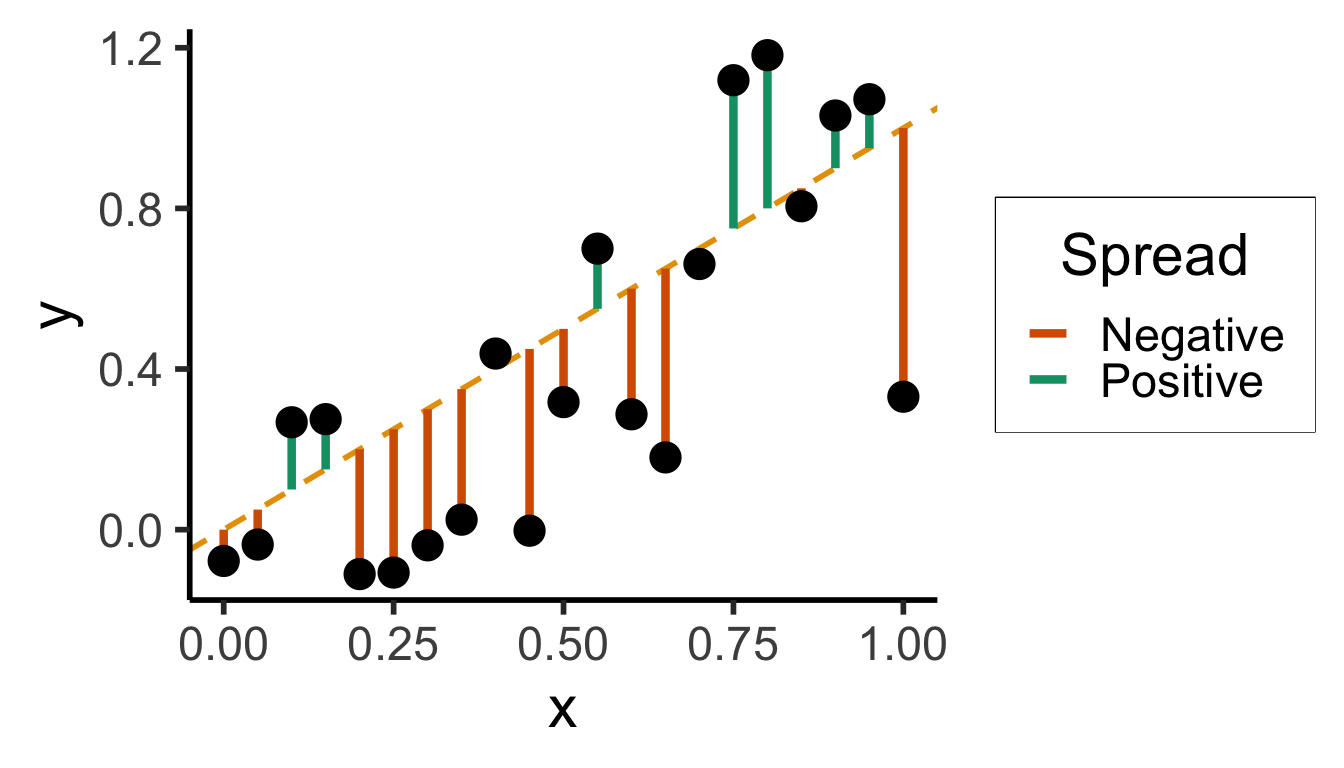
Sum?
0.0000000000
Sum of Squares?
3.8405017200
Sum of absolute vals?
7.6806094387
N <- 21
x <- seq(from = 0, to = 1, by = 1 / (N - 1))
y <- x + rnorm(N, 0, 0.05)
mean_y <- mean(y)
spread <- y - mean_y
sim_sm_df <- tibble(x = x, y = y, spread = spread)
sim_sm_df |> ggplot(aes(x=x, y=y)) +
geom_abline(slope=1, intercept=0, linetype="dashed", color=cbPalette[1], linewidth=g_linewidth) +
# geom_segment(xend=x, yend=x, linewidth=g_linewidth*2, color=cbPalette[2]) +
geom_segment(aes(xend=x, yend=x, color=ifelse(y>x,"Positive","Negative")), linewidth=1.5*g_linewidth) +
geom_point(size=g_pointsize) +
# coord_equal() +
theme_dsan("half") +
scale_color_manual("Spread", values=c("Positive"=cbPalette[3],"Negative"=cbPalette[6]), labels=c("Positive"="Positive","Negative"="Negative"))
small_rsum <- sum(sim_sm_df$spread)
writeLines(fmt_decimal(small_rsum))
small_sqrsum <- sum((sim_sm_df$spread)^2)
writeLines(fmt_decimal(small_sqrsum))
small_abssum <- sum(abs(sim_sm_df$spread))
writeLines(fmt_decimal(small_abssum))
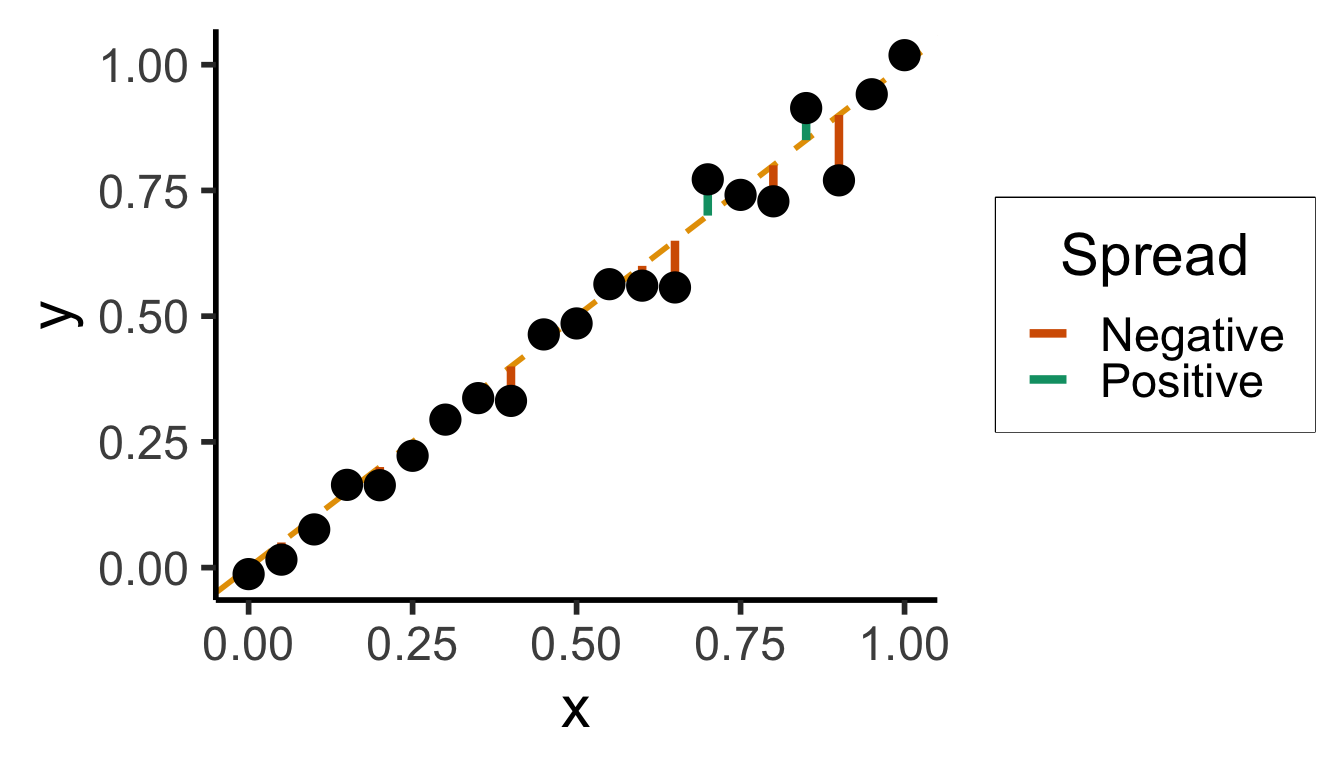
Sum?
0.0000000000
Sum of Squares?
1.9748635217
Sum of absolute vals?
5.5149697440
# Could use facet_grid() here, but it doesn't work too nicely with stat_function() :(
ggplot(data.frame(x=c(-4,4)), aes(x=x)) +
stat_function(
fun =~ abs(.x),
linewidth=g_linewidth * 1.5,
color=cb_palette[1],
) +
dsan_theme("quarter") +
labs(
title="f(x) = |x|",
y="f(x)"
)
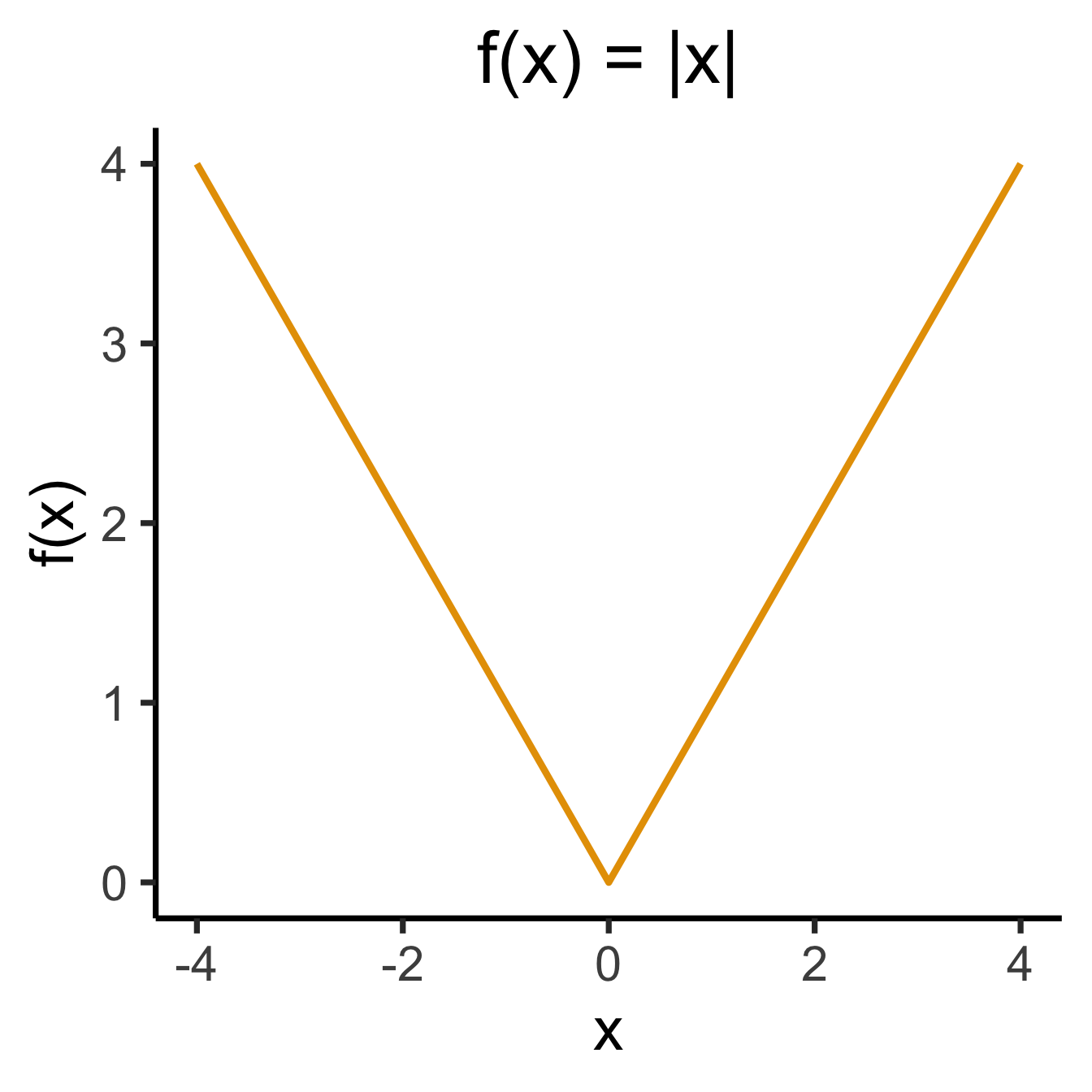
library(latex2exp)
x2_label <- TeX("$f(x) = x^2$")
ggplot(data.frame(x=c(-4,4)), aes(x=x)) +
stat_function(
fun =~ .x^2,
linewidth = g_linewidth * 1.5,
color=cb_palette[2],
) +
dsan_theme("quarter") +
labs(
title=x2_label,
y="f(x)"
)
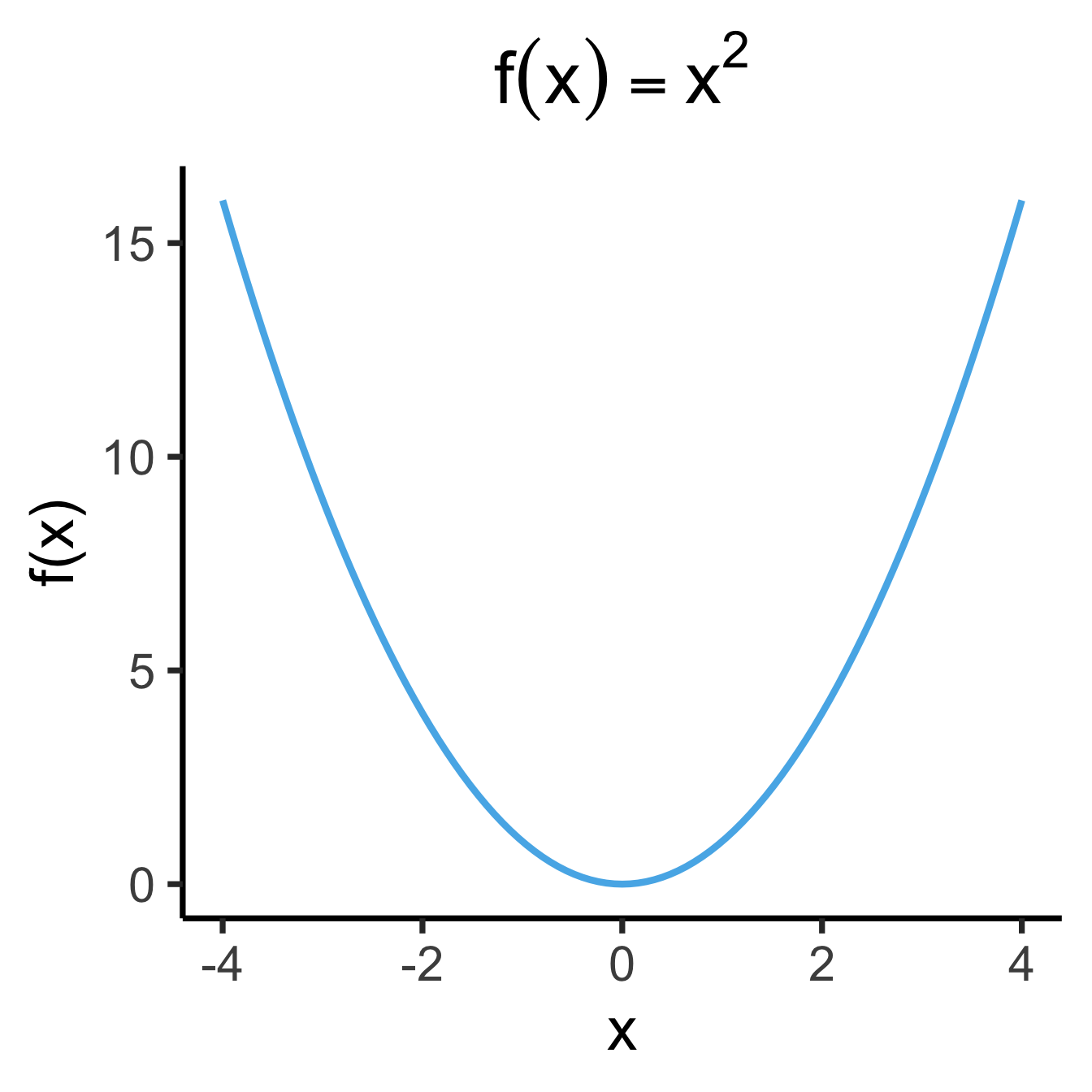
library(latex2exp)
set.seed(5300)
slope <- 0.5
x_vals <- seq(from = -20, to = 20, length.out = 15)
N <- length(x_vals)
y_vals <- slope * x_vals + rnorm(N, 0, 5)
spread_vals <- y_vals - slope * x_vals
sim_lg_df <- tibble(
x = x_vals, y = y_vals, spread = spread_vals
)
abs_sum <- round(sum(abs(sim_lg_df$spread)), 3)
abs_label <- TeX(paste0("$\\Sigma = ",abs_sum,"$"))
sim_lg_df |> ggplot(aes(x=x, y=y)) +
geom_point(size=g_pointsize * 0.9) +
geom_abline(
slope=slope,
intercept=0,
linetype="dashed",
color='black',
linewidth=g_linewidth
) +
geom_segment(
aes(xend=x, yend=slope * x),
arrow=arrow(
angle=90,
length=unit(0.125,'inches'),
ends='both'
),
linewidth=1.5*g_linewidth,
color=cb_palette[7],
alpha=0.9,
) +
ylim(-15, 15) +
xlim(-20, 27.5) +
coord_equal() +
theme_dsan(base_size=28) +
labs(title="Absolute Penalties") +
geom_text(
data=data.frame(x=15, y=-10), label=abs_label,
size=12
)
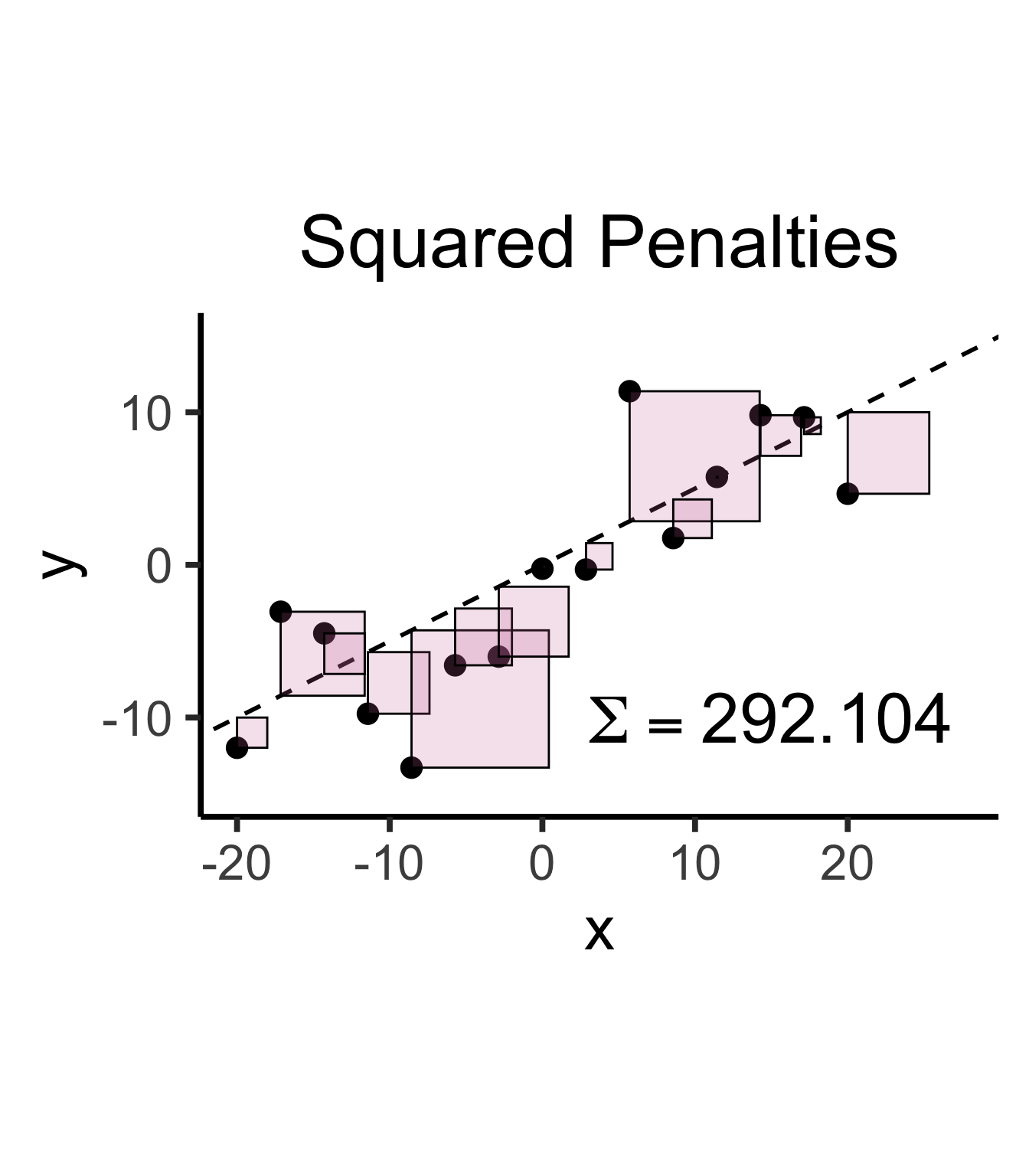
sq_sum <- round(sum((sim_lg_df$spread)^2), 3)
sq_label <- TeX(paste0("$\\Sigma = ",sq_sum,"$"))
sim_lg_df |> ggplot(aes(x=x, y=y)) +
geom_point(size=g_pointsize * 0.9) +
geom_abline(
slope=slope,
intercept=0,
linetype="dashed",
color='black',
linewidth=g_linewidth
) +
geom_rect(
aes(
xmin=x,
xmax=x+abs(spread),
ymin=ifelse(spread < 0, y, y - spread),
ymax=ifelse(spread < 0, y - spread, y)
),
color='black',
fill=cb_palette[7],
alpha=0.2,
) +
ylim(-15, 15) +
xlim(-20, 27.5) +
coord_equal() +
theme_dsan(base_size=30) +
labs(title="Squared Penalties") +
geom_text(
data=data.frame(x=15, y=-10), label=sq_label,
size=12
)Warning in is.na(x): is.na() applied to non-(list or vector) of type
'expression'
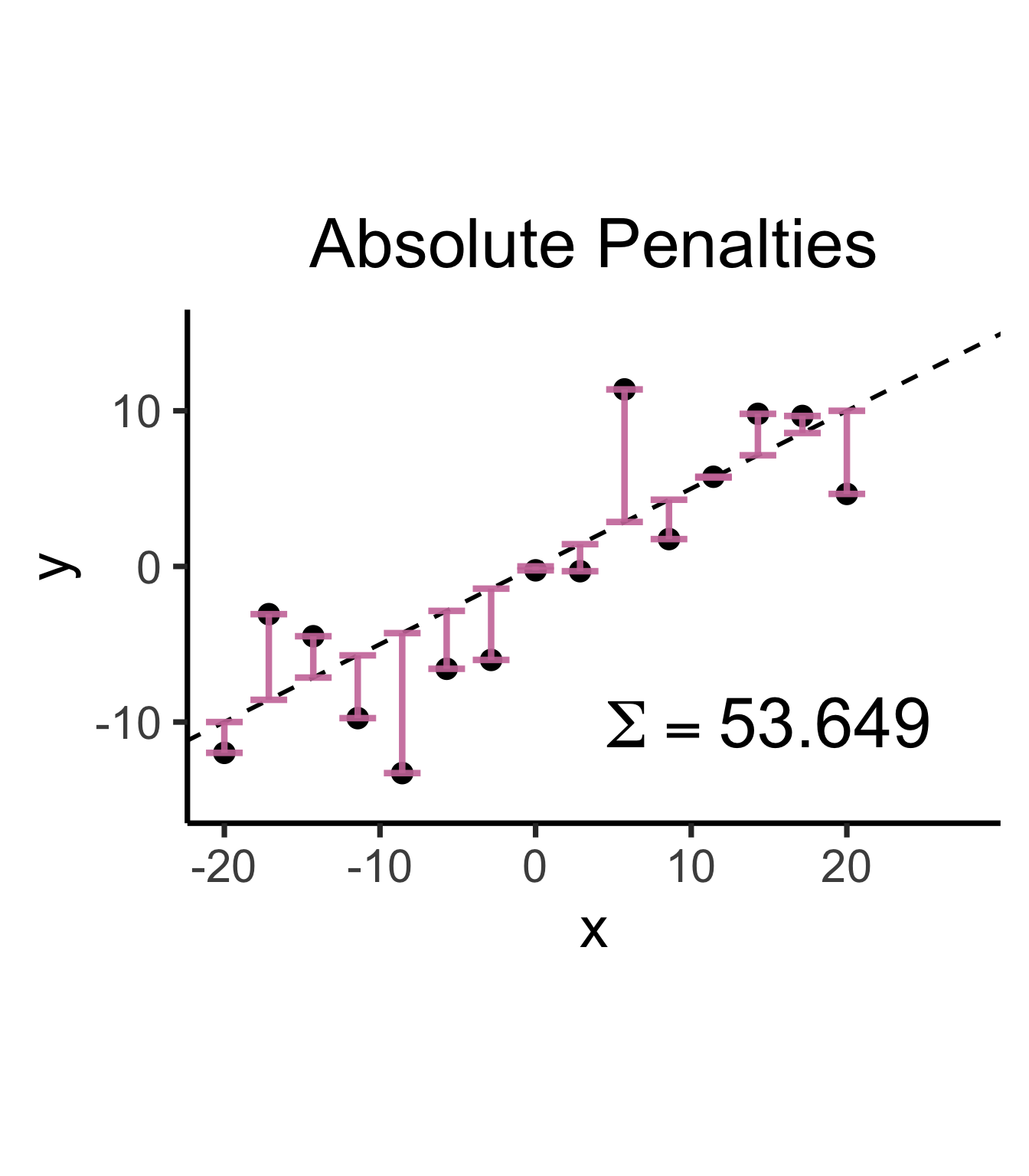
Warning in is.na(x): is.na() applied to non-(list or vector) of type
'expression'
\[ \widehat{y} = \underbrace{\widehat{\beta}_0}_{\mathclap{\small\begin{array}{c}\text{Estimated} \\[-5mm] \text{intercept}\end{array}}} ~+~ \underbrace{\widehat{\beta}_1}_{\mathclap{\small\begin{array}{c}\text{Estimated} \\[-4mm] \text{slope}\end{array}}}\cdot x \]
is chosen so that
\[ \widehat{\theta} = \left(\widehat{\beta}_0, \widehat{\beta}_1\right) = \argmin_{\beta_0, \beta_1}\left[ \sum_{x_i \in X} \left(~~\overbrace{\widehat{y}(x_i)}^{\mathclap{\small\text{Predicted }y}} - \overbrace{\expect{Y \mid X = x_i}}^{\small \text{Avg. }y\text{ when }x = x_i}\right)^{2~} \right] \]
\[ Y = \beta_1 X + \varepsilon \]
library(latex2exp)
set.seed(5300)
# rand_slope <- log(runif(80, min=0, max=1))
# rand_slope[41:80] <- -rand_slope[41:80]
# rand_lines <- tibble::tibble(
# id=1:80, slope=rand_slope, intercept=0
# )
# angles <- runif(100, -pi/2, pi/2)
angles <- seq(from=-pi/2, to=pi/2, length.out=50)
possible_lines <- tibble::tibble(
slope=tan(angles), intercept=0
)
num_points <- 30
x_vals <- runif(num_points, 0, 1)
y0_vals <- 0.5 * x_vals + 0.25
y_noise <- rnorm(num_points, 0, 0.07)
y_vals <- y0_vals + y_noise
rand_df <- tibble::tibble(x=x_vals, y=y_vals)
title_exp <- TeX("Parameter Space ($\\beta_1$)")
# Main plot object
gen_lines_plot <- function(point_size=2.5) {
lines_plot <- rand_df |> ggplot(aes(x=x, y=y)) +
geom_point(size=point_size) +
geom_hline(yintercept=0, linewidth=1.5) +
geom_vline(xintercept=0, linewidth=1.5) +
# Point at origin
geom_point(data=data.frame(x=0, y=0), aes(x=x, y=y), size=4) +
xlim(-1,1) +
ylim(-1,1) +
# coord_fixed() +
theme_dsan_min(base_size=28)
return(lines_plot)
}
main_lines_plot <- gen_lines_plot()
main_lines_plot +
# Parameter space of possible lines
geom_abline(
data=possible_lines,
aes(slope=slope, intercept=intercept, color='possible'),
# linetype="dotted",
# linewidth=0.75,
alpha=0.25
) +
# True DGP
geom_abline(
aes(
slope=0.5,
intercept=0.25,
color='true'
), linewidth=1, alpha=0.8
) +
scale_color_manual(
element_blank(),
values=c('possible'="black", 'true'=cb_palette[2]),
labels=c('possible'="Possible Fits", 'true'="True DGP")
) +
remove_legend_title() +
labs(
title=title_exp
)
rc1_df <- possible_lines |> slice(n() - 14)
# Predictions for this choice
rc1_pred_df <- rand_df |> mutate(
y_pred = rc1_df$slope * x,
resid = y - y_pred
)
rc1_label <- TeX(paste0("Estimate 1: $\\beta_1 \\approx ",round(rc1_df$slope, 3),"$"))
rc1_lines_plot <- gen_lines_plot(point_size=5)
rc1_lines_plot +
geom_abline(
data=rc1_df,
aes(intercept=intercept, slope=slope),
linewidth=2,
color=cb_palette[1]
) +
geom_segment(
data=rc1_pred_df,
aes(x=x, y=y, xend=x, yend=y_pred),
# color=cb_palette[1]
) +
xlim(0, 1) + ylim(0, 1.5) +
labs(
title = rc1_label
)
gen_resid_plot <- function(pred_df) {
rc_rss <- sum((pred_df$resid)^2)
rc_resid_label <- TeX(paste0("Residuals: RSS $\\approx$ ",round(rc_rss,3)))
rc_resid_plot <- pred_df |> ggplot(aes(x=x, y=resid)) +
geom_point(size=5) +
geom_hline(
yintercept=0,
color=cb_palette[1],
linewidth=1.5
) +
geom_segment(
aes(xend=x, yend=0)
) +
theme_dsan(base_size=28) +
theme(axis.line.x = element_blank()) +
ylim(-0.75, 0.25) +
labs(
title=rc_resid_label
)
return(rc_resid_plot)
}
rc1_resid_plot <- gen_resid_plot(rc1_pred_df)
rc1_resid_plot
rc2_df <- possible_lines |> slice(n() - 9)
# Predictions for this choice
rc2_pred_df <- rand_df |> mutate(
y_pred = rc2_df$slope * x,
resid = y - y_pred
)
rc2_label <- TeX(paste0("Estimate 2: $\\beta_1 \\approx ",round(rc2_df$slope,3),"$"))
rc2_lines_plot <- gen_lines_plot(point_size=5)
rc2_lines_plot +
geom_abline(
data=rc2_df,
aes(intercept=intercept, slope=slope),
linewidth=2,
color=cb_palette[3]
) +
geom_segment(
data=rc2_pred_df,
aes(
x=x, y=y, xend=x,
# yend=ifelse(y_pred <= 1, y_pred, Inf)
yend=y_pred
)
# color=cb_palette[1]
) +
xlim(0, 1) + ylim(0, 1.5) +
labs(
title=rc2_label
)
rc2_resid_plot <- gen_resid_plot(rc2_pred_df)Warning in latex2exp(paste0("Residuals: RSS $\\approx$ ", round(rc_rss, : 'latex2exp' is deprecated.
Use 'TeX' instead.
See help("Deprecated") and help("latex2exp-deprecated").
rc2_resid_plot
\[ \begin{align*} \beta_1^* = \overbrace{\argmin}^{\begin{array}{c} \text{\small{Find thing}} \\[-5mm] \text{\small{that minimizes}}\end{array}}_{\beta_1}\left[ \sum_{i=1}^{n}(y_i - \widehat{y}_i)^2 \right] = \argmin_{\beta_1}\left[ \sum_{i=1}^{n}(y_i - \beta_1x_i)^2 \right] \end{align*} \]
We can compute this derivative to obtain:
\[ \frac{\partial}{\partial\beta_1}\left[ \sum_{i=1}^{n}(\beta_1x_i - y_i)^2 \right] = \sum_{i=1}^{n}\frac{\partial}{\partial\beta_1}(\beta_1x_i - y_i)^2 = \sum_{i=1}^{n}2(\beta_1x_i - y_i)x_i \]
And our first-order condition means that:
\[ \sum_{i=1}^{n}2(\beta_1^*x_i - y_i)x_i = 0 \iff \beta_1^*\sum_{i=1}^{n}x_i^2 = \sum_{i=1}^{n}x_iy_i \iff \boxed{\beta_1^* = \frac{\sum_{i=1}^{n}x_iy_i}{\sum_{i=1}^{n}x_i^2}} \]
R vs. statsmodelslm()
lin_model <- lm(sales ~ TV, data=ad_df)
summary(lin_model)
Call:
lm(formula = sales ~ TV, data = ad_df)
Residuals:
Min 1Q Median 3Q Max
-8.3860 -1.9545 -0.1913 2.0671 7.2124
Coefficients:
Estimate Std. Error t value Pr(>|t|)
(Intercept) 7.032594 0.457843 15.36 <2e-16 ***
TV 0.047537 0.002691 17.67 <2e-16 ***
---
Signif. codes: 0 '***' 0.001 '**' 0.01 '*' 0.05 '.' 0.1 ' ' 1
Residual standard error: 3.259 on 198 degrees of freedom
Multiple R-squared: 0.6119, Adjusted R-squared: 0.6099
F-statistic: 312.1 on 1 and 198 DF, p-value: < 2.2e-16
General syntax:
lm(
dependent ~ independent + controls,
data = my_df
)smf.ols()
import statsmodels.formula.api as smf
results = smf.ols("sales ~ TV", data=ad_df).fit()
print(results.summary(slim=True)) OLS Regression Results
==============================================================================
Dep. Variable: sales R-squared: 0.612
Model: OLS Adj. R-squared: 0.610
No. Observations: 200 F-statistic: 312.1
Covariance Type: nonrobust Prob (F-statistic): 1.47e-42
==============================================================================
coef std err t P>|t| [0.025 0.975]
------------------------------------------------------------------------------
Intercept 7.0326 0.458 15.360 0.000 6.130 7.935
TV 0.0475 0.003 17.668 0.000 0.042 0.053
==============================================================================
Notes:
[1] Standard Errors assume that the covariance matrix of the errors is correctly specified.
General syntax:
smf.ols(
"dependent ~ independent + controls",
data = my_df
)library(tidyverse)
gdp_df <- read_csv("assets/gdp_pca.csv")
mil_plot <- gdp_df |> ggplot(aes(x=industrial, y=military)) +
geom_point(size=0.5*g_pointsize) +
geom_smooth(method='lm', formula="y ~ x", linewidth=1) +
theme_dsan() +
labs(
title="Military Exports vs. Industrialization",
x="Industrial Production (% of GDP)",
y="Military Exports (% of All Exports)"
)mil_plot + theme_dsan("quarter")
gdp_model <- lm(military ~ industrial, data=gdp_df)
summary(gdp_model)
Call:
lm(formula = military ~ industrial, data = gdp_df)
Residuals:
Min 1Q Median 3Q Max
-2.3354 -1.0997 -0.3870 0.6081 6.7508
Coefficients:
Estimate Std. Error t value Pr(>|t|)
(Intercept) 0.61969 0.59526 1.041 0.3010
industrial 0.05253 0.02019 2.602 0.0111 *
---
Signif. codes: 0 '***' 0.001 '**' 0.01 '*' 0.05 '.' 0.1 ' ' 1
Residual standard error: 1.671 on 79 degrees of freedom
(8 observations deleted due to missingness)
Multiple R-squared: 0.07895, Adjusted R-squared: 0.06729
F-statistic: 6.771 on 1 and 79 DF, p-value: 0.01106
| Estimate | Std. Error | t value | Pr(>|t|) | ||
|---|---|---|---|---|---|
| (Intercept) | 0.61969 | 0.59526 | 1.041 | 0.3010 | |
| industrial | 0.05253 | 0.02019 | 2.602 | 0.0111 | * |
| \(\widehat{\beta}\) | Uncertainty | Test stat \(t\) | How extreme is \(t\)? | Signif. Level |
\[ \widehat{y} \approx \class{cb1}{\overset{\beta_0}{\underset{\small \pm 0.595}{0.620}}} + \class{cb2}{\overset{\beta_1}{\underset{\small \pm 0.020}{0.053}}} \cdot x \]
| Estimate | Std. Error | t value | Pr(>|t|) | ||
|---|---|---|---|---|---|
| (Intercept) | 0.61969 | 0.59526 | 1.041 | 0.3010 | |
| industrial | 0.05253 | 0.02019 | 2.602 | 0.0111 | * |
| \(\widehat{\beta}\) | Uncertainty | Test stat \(t\) | How extreme is \(t\)? | Signif. Level |
library(ggplot2)
int_tstat <- 1.041
int_tstat_str <- sprintf("%.02f", int_tstat)
label_df_int <- tribble(
~x, ~y, ~label,
0.25, 0.05, paste0("P(t > ",int_tstat_str,")\n= 0.3")
)
label_df_signif_int <- tribble(
~x, ~y, ~label,
2.7, 0.075, "95% Signif.\nCutoff"
)
funcShaded <- function(x, lower_bound, upper_bound){
y <- dnorm(x)
y[x < lower_bound | x > upper_bound] <- NA
return(y)
}
funcShadedIntercept <- function(x) funcShaded(x, int_tstat, Inf)
funcShadedSignif <- function(x) funcShaded(x, 1.96, Inf)
ggplot(data=data.frame(x=c(-3,3)), aes(x=x)) +
stat_function(fun=dnorm, linewidth=g_linewidth) +
geom_vline(aes(xintercept=int_tstat), linewidth=g_linewidth, linetype="dashed") +
geom_vline(aes(xintercept = 1.96), linewidth=g_linewidth, linetype="solid") +
stat_function(fun = funcShadedIntercept, geom = "area", fill = cbPalette[1], alpha = 0.5) +
stat_function(fun = funcShadedSignif, geom = "area", fill = "grey", alpha = 0.333) +
geom_text(label_df_int, mapping = aes(x = x, y = y, label = label), size = 10) +
geom_text(label_df_signif_int, mapping = aes(x = x, y = y, label = label), size = 8) +
# Add single additional tick
scale_x_continuous(breaks=c(-2, 0, int_tstat, 2), labels=c("-2","0",int_tstat_str,"2")) +
dsan_theme("quarter") +
labs(
title = "t Value for Intercept",
x = "t",
y = "Density"
) +
theme(axis.text.x = element_text(colour = c("black", "black", cbPalette[1], "black")))
library(ggplot2)
coef_tstat <- 2.602
coef_tstat_str <- sprintf("%.02f", coef_tstat)
label_df_coef <- tribble(
~x, ~y, ~label,
3.65, 0.06, paste0("P(t > ",coef_tstat_str,")\n= 0.01")
)
label_df_signif_coef <- tribble(
~x, ~y, ~label,
1.05, 0.03, "95% Signif.\nCutoff"
)
funcShadedCoef <- function(x) funcShaded(x, coef_tstat, Inf)
ggplot(data=data.frame(x=c(-4,4)), aes(x=x)) +
stat_function(fun=dnorm, linewidth=g_linewidth) +
geom_vline(aes(xintercept=coef_tstat), linetype="dashed", linewidth=g_linewidth) +
geom_vline(aes(xintercept=1.96), linetype="solid", linewidth=g_linewidth) +
stat_function(fun = funcShadedCoef, geom = "area", fill = cbPalette[2], alpha = 0.5) +
stat_function(fun = funcShadedSignif, geom = "area", fill = "grey", alpha = 0.333) +
# Label shaded area
geom_text(label_df_coef, mapping = aes(x = x, y = y, label = label), size = 10) +
# Label significance cutoff
geom_text(label_df_signif_coef, mapping = aes(x = x, y = y, label = label), size = 8) +
coord_cartesian(clip = "off") +
# Add single additional tick
scale_x_continuous(breaks=c(-4, -2, 0, 2, coef_tstat, 4), labels=c("-4", "-2","0", "2", coef_tstat_str,"4")) +
dsan_theme("quarter") +
labs(
title = "t Value for Coefficient",
x = "t",
y = "Density"
) +
theme(axis.text.x = element_text(colour = c("black", "black", "black", "black", cbPalette[2], "black")))
Recall homoskedasticity assumption: Given our model
\[ y_i = \beta_0 + \beta_1x_i + \varepsilon_i \]
the errors \(\varepsilon_i\) should not vary systematically with \(i\)
Formally: \(\forall i \left[ \Var{\varepsilon_i} = \sigma^2 \right]\)
library(broom)
gdp_resid_df <- augment(gdp_model)
ggplot(gdp_resid_df, aes(x = industrial, y = .resid)) +
geom_point(size = g_pointsize/2) +
geom_hline(yintercept=0, linetype="dashed") +
dsan_theme("quarter") +
labs(
title = "Residual Plot for Military ~ Industrial",
x = "Fitted Value",
y = "Residual"
)
x <- 1:80
errors <- rnorm(length(x), 0, x^2/1000)
y <- x + errors
het_model <- lm(y ~ x)
df_het <- augment(het_model)
ggplot(df_het, aes(x = .fitted, y = .resid)) +
geom_point(size = g_pointsize / 2) +
geom_hline(yintercept = 0, linetype = "dashed") +
dsan_theme("quarter") +
labs(
title = "Residual Plot for Heteroskedastic Data",
x = "Fitted Value",
y = "Residual"
)
ggplot(df_het, aes(sample=.resid)) +
stat_qq(size = g_pointsize/2) + stat_qq_line(linewidth = g_linewidth) +
dsan_theme(base_size=30) +
labs(
title = "Q-Q Plot for Heteroskedastic Data",
x = "Normal Distribution Quantiles",
y = "Observed Data Quantiles"
)
ggplot(gdp_resid_df, aes(sample=.resid)) +
stat_qq(size = g_pointsize/2) + stat_qq_line(linewidth = g_linewidth) +
dsan_theme(base_size=30) +
labs(
title = "Q-Q Plot for Industrial ~ Military Residuals",
x = "Normal Distribution Quantiles",
y = "Observed Data Quantiles"
)
\[ \widehat{y}_i = \beta_0 + \beta_1x_{i,1} + \beta_2x_{i,2} + \cdots + \beta_M x_{i,M} \]
mlr_model <- lm(sales ~ TV + radio + newspaper, data=ad_df)
print(summary(mlr_model))
Call:
lm(formula = sales ~ TV + radio + newspaper, data = ad_df)
Residuals:
Min 1Q Median 3Q Max
-8.8277 -0.8908 0.2418 1.1893 2.8292
Coefficients:
Estimate Std. Error t value Pr(>|t|)
(Intercept) 2.938889 0.311908 9.422 <2e-16 ***
TV 0.045765 0.001395 32.809 <2e-16 ***
radio 0.188530 0.008611 21.893 <2e-16 ***
newspaper -0.001037 0.005871 -0.177 0.86
---
Signif. codes: 0 '***' 0.001 '**' 0.01 '*' 0.05 '.' 0.1 ' ' 1
Residual standard error: 1.686 on 196 degrees of freedom
Multiple R-squared: 0.8972, Adjusted R-squared: 0.8956
F-statistic: 570.3 on 3 and 196 DF, p-value: < 2.2e-16
Holding radio and newspaper spending constant…
TV ads is associated with…Holding TV and newspaper spending constant…
radio ads is associated with…\[ \texttt{sales} = \overset{*}{\beta_0} + \overset{*}{\beta_1}\texttt{newspaper} \]
library(stats)
lr_model <- lm(sales ~ newspaper, data=ad_df)
printCoefmat(coef(summary(lr_model))) Estimate Std. Error t value Pr(>|t|)
(Intercept) 12.351407 0.621420 19.8761 < 2.2e-16 ***
newspaper 0.054693 0.016576 3.2996 0.001148 **
---
Signif. codes: 0 '***' 0.001 '**' 0.01 '*' 0.05 '.' 0.1 ' ' 1
\[ \texttt{sales} = \overset{*}{\beta_0} + \overset{*}{\beta_1}\texttt{TV} + \overset{*}{\beta_2}\texttt{radio} + \overset{(~~)}{\beta_3}\texttt{paper} \]
# print(summary(mlr_model))
printCoefmat(coef(summary(mlr_model))) Estimate Std. Error t value Pr(>|t|)
(Intercept) 2.9388894 0.3119082 9.4223 <2e-16 ***
TV 0.0457646 0.0013949 32.8086 <2e-16 ***
radio 0.1885300 0.0086112 21.8935 <2e-16 ***
newspaper -0.0010375 0.0058710 -0.1767 0.8599
---
Signif. codes: 0 '***' 0.001 '**' 0.01 '*' 0.05 '.' 0.1 ' ' 1
newspaper \(\overset{*}{\rightarrow}\) sales in SLR, but newspaper \(\overset{*}{\not\rightarrow}\) sales in MLR?cor(ad_df |> select(-id)) TV radio newspaper sales
TV 1.00000000 0.05480866 0.05664787 0.7822244
radio 0.05480866 1.00000000 0.35410375 0.5762226
newspaper 0.05664787 0.35410375 1.00000000 0.2282990
sales 0.78222442 0.57622257 0.22829903 1.0000000
radio our sales will tend to be higher…newspaper in those same markets…sales vs. newspaper, we (correctly!) observe that higher values of newspaper are associated with higher values of sales…newspaper advertising is a surrogate for radio advertising \(\implies\) in our SLR, newspaper “gets credit” for the association between radio and sales(Preview for next week)
\[ Y = \beta_0 + \beta_1 \times \texttt{income} \]
credit_df <- read_csv("assets/Credit.csv")
credit_plot <- credit_df |> ggplot(aes(x=Income, y=Balance)) +
geom_point(size=0.5*g_pointsize) +
geom_smooth(method='lm', formula="y ~ x", linewidth=1) +
theme_dsan() +
labs(
title="Credit Card Balance vs. Income Level",
x="Income ($1K)",
y="Credit Card Balance ($)"
)
credit_plot
\[ \begin{align*} Y = &\beta_0 + \beta_1 \times \texttt{income} + \beta_2 \times \texttt{Student} \\ &+ \beta_3 \times (\texttt{Student} \times \texttt{Income}) \end{align*} \]
student_plot <- credit_df |> ggplot(aes(x=Income, y=Balance, color=Student)) +
geom_point(size=0.5*g_pointsize) +
geom_smooth(method='lm', formula="y ~ x", linewidth=1) +
theme_dsan() +
labs(
title="Credit Card Balance vs. Income Level",
x="Income ($1K)",
y="Credit Card Balance ($)"
)
student_plot
“Fitting” a statistical model to data means minimizing some loss function that measures “how bad” our predictions are:
Find \(x^*\), the solution to
\[ \begin{align} \min_{x} ~ & f(x) &\text{(Objective function)} \\ \text{s.t. } ~ & g(x) = 0 &\text{(Constraints)} \end{align} \]
\[ x^* = \argmax_{x,~\lambda}f(x) - \lambda[g(x)] \]
(Why worry about constraints when OLS is unconstrained? …Soon we’ll need to penalize complexity!)
Find \(x^*\), the solution to
\[ \begin{align} \min_{x} ~ & f(x) = 3x^2 - x \\ \text{s.t. } ~ & \varnothing \end{align} \]
Computing the derivative:
\[ f'(x) = \frac{\partial}{\partial x}f(x) = \frac{\partial}{\partial x}\left[3x^2 - x\right] = 6x - 1, \]
Solving for \(x^*\), the value(s) satisfying \(\frac{\partial}{\partial x}f'(x^*) = 0\) for just-derived \(f'(x)\):
\[ f'(x^*) = 0 \iff 6x^* - 1 = 0 \iff x^* = \frac{1}{6}. \]
| Type of Thing | Thing | Change in Thing when \(x\) Changes by Tiny Amount |
|---|---|---|
| Polynomial | \(f(x) = x^n\) | \(f'(x) = \frac{\partial}{\partial x}f(x) = nx^{n-1}\) |
| Fraction | \(f(x) = \frac{1}{x}\) | Use Polynomial rule (since \(\frac{1}{x} = x^{-1}\)) to get \(f'(x) = -\frac{1}{x^2}\) |
| Logarithm | \(f(x) = \ln(x)\) | \(f'(x) = \frac{\partial}{\partial x} = \frac{1}{x}\) |
| Exponential | \(f(x) = e^x\) | \(f'(x) = \frac{\partial}{\partial x}e^x = e^x\) (🧐❗️) |
| Multiplication | \(f(x) = g(x)h(x)\) | \(f'(x) = g'(x)h(x) + g(x)h'(x)\) |
| Division | \(f(x) = \frac{g(x)}{h(x)}\) | Too hard to memorize… turn it into Multiplication, as \(f(x) = g(x)(h(x))^{-1}\) |
| Composition (Chain Rule) | \(f(x) = g(h(x))\) | \(f'(x) = g'(h(x))h'(x)\) |
| Fancy Logarithm | \(f(x) = \ln(g(x))\) | \(f'(x) = \frac{g'(x)}{g(x)}\) by Chain Rule |
| Fancy Exponential | \(f(x) = e^{g(x)}\) | \(f'(x) = g'(x)e^{g(x)}\) by Chain Rule |