At some point during Week 4, you may have noticed a somewhat-jarring shift in our approach to data analytics…
Specifically, you may have noticed that:
Polars basically lets you “supercharge” your Pandas skills, by taking Pandas objects (like DataFrames) and functions (like read_csv()) and re-building them from the ground up for distributed cloud environments, alongside some new functions like scan_csv() and sink_csv()
DuckDB, on the other hand, probably felt far less familiar coming from Pandas. In a sense you can think of it as coming from the “opposite direction”: rather than adapting Pandas syntax to big-data workflows like Polars, DuckDB takes a language that’s already commonly used for database creation and manipulation in big-data workflows (namely, SQL) and adapts this SQL language for use with Pandas.
So, given that your work in DSAN courses like DSAN 5000 and DSAN 5300 has been primarily oriented around Pandas syntax and coding patterns, the goal of this writeup is to get you up-to-speed with how you can “translate” the types of things you’re used to doing with Pandas code into equivalent SQL queries.
Eager vs. Lazy Evaluation
As a final note before we “zoom in” and focus on SQL, though: keep in mind that this move from code to queries is part of our endeavor in this class to start decoupling data from computation! In an eager-evaluation setting like Pandas code, when we write a data-processing pipeline, the steps are immediately evaluated, line-by-line (like any other Python code). Consider the following example, where the goal of the pipeline is to figure out our average ratio of sleep hours to work hours on weekdays:
Code
import pandas as pdimport numpy as nprng = np.random.default_rng(seed=6000)import calendarlist(calendar.day_name)sleep_df = pd.DataFrame({'day': list(calendar.day_name),'sleep_hrs': rng.uniform(3, 8, size=7),'work_hrs': rng.uniform(6, 10, size=7),})display(sleep_df)
# Step 2: Filter to just weekdaysweekend_days = ['Saturday', 'Sunday']weekday_df = ratio_df[~ratio_df['day'].isin(weekend_days)]display(weekday_df)
day
sleep_hrs
work_hrs
ratio
0
Monday
6.089095
7.418997
1.218407
1
Tuesday
7.912447
8.747633
1.105553
2
Wednesday
5.393727
6.011502
1.114536
3
Thursday
4.347202
7.318025
1.683387
4
Friday
4.556042
6.341836
1.391962
Code
# Step 3: Compute mean ratio over the weekdaysweekday_df['ratio'].mean()
np.float64(1.3027691063719424)
Notice here, however, that we are carrying out unnecessary computations in Step 1! Since we’re going to drop the weekend rows in Step 2 anyways, there is no need to compute the ratio for these two days. Since Python (and thus Pandas) is evaluated line-by-line, however, Pandas has no way of knowing that these two ratios don’t need to be computed. It simply does what it is told, dutifully computing all 7 ratios.
There is an alternative approach here: we could instead write out our “plan” for this pipeline in advance, in the form of a query, before actually running any code! We can then utilize a query optimization engine like Polars, which can scan over our query and figure out that we don’t need to compute ratios for weekend days, since they would be dropped in Step 2! Here is the same pipeline re-written using Polars’ LazyFrame in place of a Pandas DataFrame:
Note that no computation has actually taken place yet! We have just written out our plan for the computation, in the form of Polars expressions (which don’t actually run until they’re paired with a context).
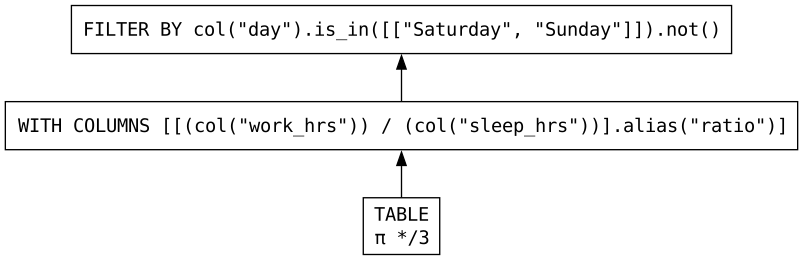
Because of this, we can see Polars’ query optimization engine in action. First, we can use the optimized=False argument to show_graph() to see what our pipeline looks like without any optimizations (that is, running line-by-line as written, as our Pandas code did above):
Code
compute_ratios_expr.show_graph(optimized=False)
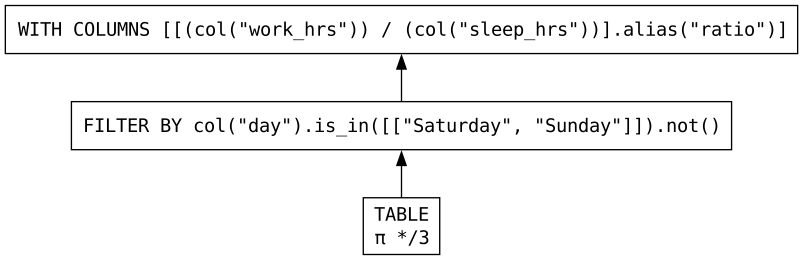
Remember that these query plans should be read from bottom to top. Now, compare that with the following graph, which shows our query after Polars scans over our instructions, detecting points where it can re-arrange our pipeline for greater efficiency:
Code
compute_ratios_expr.show_graph()
Notice the difference in the ordering of steps: Polars has successfully figured out that it should filter out the weekend days before carrying out the calculations!
Onto DuckDB!
Once you get the hang of the material in Weeks 4-6, it may slowly dawn on you that Polars is kind of a… “middle ground” compromise, allowing:
Pandas enthusiasts who are most comfortable writing Python code but want to write it in a way that it can be optimized before execution to “meet halfway” with
SQL enthusiasts who are already used to writing all of their queries out before executing them
I choose the “meet halfway” metaphor very specifically because, when you write Polars expressions like the compute_ratios_expr expression in the above code block, you are essentially writing SQL queries programmatically! Meaning, as you become more and more comfortable with Polars, you are also implicitly becoming more and more comfortable with writing queries, you just don’t know it yet!
To see what I mean, let’s do one final “translation” and re-write our pipeline once more using DuckDB this time:
Code
import duckdbcon = duckdb.connect()ratio_query ="""SELECT day, sleep_hrs, work_hrs, work_hrs / sleep_hrs AS ratioFROM sleep_dfWHERE day NOT IN ('Saturday','Sunday')"""result_df = con.execute(ratio_query).df()result_df
day
sleep_hrs
work_hrs
ratio
0
Monday
6.089095
7.418997
1.218407
1
Tuesday
7.912447
8.747633
1.105553
2
Wednesday
5.393727
6.011502
1.114536
3
Thursday
4.347202
7.318025
1.683387
4
Friday
4.556042
6.341836
1.391962
Now, just like with Polars, we can ask DuckDB to explain how it will carry out this query: the syntax is a bit weird, but you can just add the commands EXPLAIN ANALYZE to the beginning of any query to obtain DuckDB’s query plan:
EXPLAIN ANALYZE
SELECT
  day,
  sleep_hrs,
  work_hrs,
  work_hrs / sleep_hrs AS ratio
FROM sleep_df
WHERE day NOT IN ('Saturday','Sunday')

┌─────────────────────────────────────┐
│┌───────────────────────────────────┐│
││    Query Profiling Information    ││
│└───────────────────────────────────┘│
└─────────────────────────────────────┘
EXPLAIN ANALYZE  SELECT   day,   sleep_hrs,   work_hrs,   work_hrs / sleep_hrs AS ratio FROM sleep_df WHERE day NOT IN ('Saturday','Sunday')
┌────────────────────────────────────────────────┐
│┌──────────────────────────────────────────────┐│
││              Total Time: 0.0014s             ││
│└──────────────────────────────────────────────┘│
└────────────────────────────────────────────────┘
┌───────────────────────────┐
│           QUERY           │
└─────────────┬─────────────┘
┌─────────────┴─────────────┐
│      EXPLAIN_ANALYZE      │
│    ────────────────────   │
│                           │
│           0 rows          │
│           0.00s           │
└─────────────┬─────────────┘
┌─────────────┴─────────────┐
│         PROJECTION        │
│    ────────────────────   │
│            day            │
│         sleep_hrs         │
│          work_hrs         │
│           ratio           │
│                           │
│                           │
│                           │
│           5 rows          │
│           0.00s           │
└─────────────┬─────────────┘
┌─────────────┴─────────────┐
│           FILTER          │
│    ────────────────────   │
│ ((day != 'Saturday') AND  │
│     (day != 'Sunday'))    │
│                           │
│                           │
│                           │
│           5 rows          │
│           0.00s           │
└─────────────┬─────────────┘
┌─────────────┴─────────────┐
│         TABLE_SCAN        │
│    ────────────────────   │
│   Function: PANDAS_SCAN   │
│                           │
│        Projections:       │
│            day            │
│         sleep_hrs         │
│          work_hrs         │
│                           │
│                           │
│                           │
│           7 rows          │
│           0.00s           │
└───────────────────────────┘
And, like before (again reading from bottom to top of the query plan), we can see that despite us writing the division work_hrs / sleep_hrsearlier in our query than the filtering step (the WHERE statement), DuckDB has also successfully figured out that executing these in reverse order is more efficient! (The PROJECTION step, occurring after the FILTER step, is the first step where the ratio result appears)
Basic Pandas Operations in SQL
With all that in mind, you can now move towards thinking through how you can carry out the above sequence of “translations” – from Pandas to Polars to DuckDB – for other common Pandas tasks you’re used to from e.g. DSAN 5000!
To nudge you in that direction, in this section we’ll conclude with a few examples of common Pandas pipelines and how they translate to SQL code.
Filtering Rows
This is probably the most straightforward operation in SQL world, since SQL provides us with the WHERE operator which we can pair with a boolean condition to filter the rows of our DataFrame.
So, for example, if we wanted to select one specific row in our DataFrame on the basis of some value, we can do this using the general syntax SELECT * FROM df WHERE condition. The following code uses this syntax to select just the row containing data for Thursday:
Code
con.execute("""SELECT * FROM sleep_dfWHERE day = 'Friday'""").df()
day
sleep_hrs
work_hrs
0
Friday
4.556042
6.341836
Notice how, since SQL is a “declarative” language, it avoids the confusion which comes up in Python between the single-equals-sign assignment operator= and the double-equals-sign equality operator==. In SQL, you can actually use either of these in a boolean operator to indicate that you’d like to check for equality, though the single-equals-sign = used above is more common:
Code
con.execute("""SELECT * FROM sleep_dfWHERE day == 'Friday'""").df()
day
sleep_hrs
work_hrs
0
Friday
4.556042
6.341836
You may have noticed, however, that we didn’t use this = operator when filtering out weekend days above. Instead, we used the IN operator, along with the NOT operator for negation. The IN operator on its own works like:
Code
con.execute("""SELECT * FROM sleep_dfWHERE day IN ('Monday','Wednesday','Friday')""").df()
day
sleep_hrs
work_hrs
0
Monday
6.089095
7.418997
1
Wednesday
5.393727
6.011502
2
Friday
4.556042
6.341836
And then we can use the NOT operator to obtain the exact opposite (the days which are not among the three listed days in the query):
Code
con.execute("""SELECT * FROM sleep_dfWHERE day NOT IN ('Monday','Wednesday','Friday')""").df()
day
sleep_hrs
work_hrs
0
Tuesday
7.912447
8.747633
1
Thursday
4.347202
7.318025
2
Saturday
4.552443
7.279092
3
Sunday
6.606959
6.652768
Selecting Columns
Notice how, up until now, we’ve been using SELECT * at the beginning of our queries. That’s because our goal was to view the entire contents of the DataFrame, just with certain rows selected and others filtered out.
If we instead want to select certain columns, we can just replace the wildcard symbol * that we placed after SELECT with a specific list of columns:
Code
con.execute("""SELECT day, work_hrs FROM sleep_df""").df()
day
work_hrs
0
Monday
7.418997
1
Tuesday
8.747633
2
Wednesday
6.011502
3
Thursday
7.318025
4
Friday
6.341836
5
Saturday
7.279092
6
Sunday
6.652768
Importantly, we can also match regular expression patterns in the names of columns, by using SELECT COLUMNS() rather than just SELECT. Here, for example, we use it to select all of the columns whose names end with hrs:
Code
con.execute("""SELECT COLUMNS('.+_hrs') FROM sleep_df""").df()
sleep_hrs
work_hrs
0
6.089095
7.418997
1
7.912447
8.747633
2
5.393727
6.011502
3
4.347202
7.318025
4
4.556042
6.341836
5
4.552443
7.279092
6
6.606959
6.652768
Note that this COLUMNS() syntax is specific to DuckDB’s “flavor” of SQL, and not standard in other implementations of SQL.
Defining New Columns
Finally, you may have noticed that the SELECT operator is basically doing double duty: not only did we use it in the previous section to request the three original columns in sleep_df (day, sleep_hrs, and work_hrs), but also to define a new column named ratio, by dividing work_hrs by sleep_hrs.
This is a general feature of SQL, and DuckDB (and the select() function in Polars)! We can SELECT the columns “as-is” by just including their names, or we can define new columns within the select statement. For example, if we wanted the squared values of our two numeric columns for some reason, we could do the following:
Code
con.execute("""SELECT day, sleep_hrs, sleep_hrs^2 AS sleep_squared, work_hrs, work_hrs^2 AS work_squaredFROM sleep_df""").df()
day
sleep_hrs
sleep_squared
work_hrs
work_squared
0
Monday
6.089095
37.077083
7.418997
55.041509
1
Tuesday
7.912447
62.606823
8.747633
76.521076
2
Wednesday
5.393727
29.092288
6.011502
36.138152
3
Thursday
4.347202
18.898161
7.318025
53.553486
4
Friday
4.556042
20.757516
6.341836
40.218888
5
Saturday
4.552443
20.724741
7.279092
52.985182
6
Sunday
6.606959
43.651905
6.652768
44.259327
Combining Operations
To bring everything together, let’s see how we can combine the above three tasks into a single query!
Code
con.execute("""SELECT day, work_hrs, work_hrs^2 AS work_squaredFROM sleep_dfWHERE day = 'Tuesday'""").df()