Setting Up a Spark Cluster “Manually”
In my head, there are two important levels of abstraction we’ve been working within as we’ve explored Spark thus far:
- The level of actual analysis of data, i.e., the “high-level” perspective: here, we create objects like Spark
DataFrames and work with them almost the same way we’d work with non-distributed PandasDataFrames, letting Spark just “handle the details” of how to actually carry out the operations we want to perform, given that the data [or the computation itself] exceeds the capacity of a single computer. - The level of infrastructure, i.e., the “low-level” perspective: here, we do worry about exactly how to split up our data, set up EC2 instances / S3 buckets, and so on, rather than letting Spark “just handle it”, under the hood.
It’s exactly by taking this latter approach that we’re able to overcome the “wall” we hit when working with Athena: it doesn’t know in advance what types of queries we’re going to run on the data, so it has no way of optimizing the data-splitting in advance.
But, unlike Athena, we may know in advance what types of queries we’re going to run on the data! And so, we can use this knowledge when working from the “lower-level” infrastructure perspective to ensure that the data that a particular computer \(X\) is going to process is actually on (or at least, easily accessible from) computer \(X\)!
It can be hard to wrap our heads around this in the abstract – for me, it didn’t exactly “click” fully until I could think of it as me sending concrete pieces of data to concrete computers existing somewhere physically in the world! So, if that’s you as well, here I will walk through the more tedious [but rewarding, imo!] process of literally setting up four individual computers, each running the Spark software, so that you can have a [sort of] physical, concrete mental picture of what exactly Spark is doing when it “just handles” our higher-level DataFrame-based work.
Setting Up the Instances
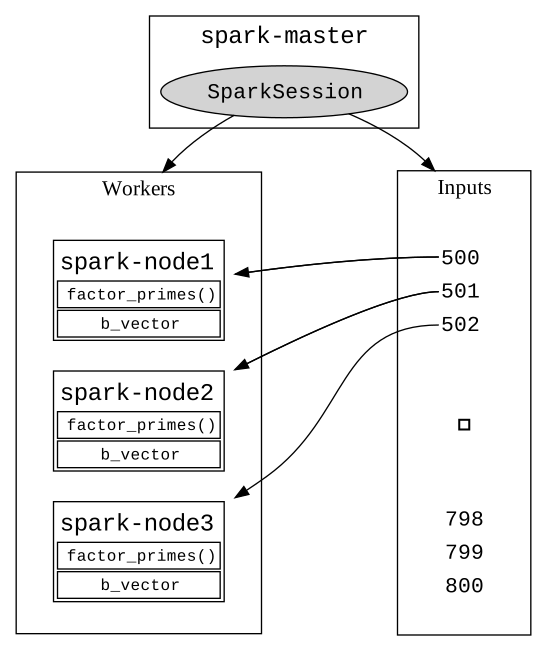
Here, using the NSF’s Jetstream interface, I set up four new computers, using the lowest possible setting in terms of computational resources: g3.medium, which on Jetstream corresponds to a computer with 8 CPU cores, 30GB of RAM, and a 60GB HDD. The first one is named spark-master, while the other three are named spark-worker1, spark-worker2, and spark-worker3. This naming setup exactly corresponds to individual pieces of this type of diagram that I’ve drawn on the board over the past 2 weeks to illustrate parallel processing in general and Map-Reduce approach to parallel processing specifically: