Week 5: From DuckDB to Polars

DSAN 6000: Big Data and Cloud Computing
Fall 2026

Jeff Jacobs

jj1088@georgetown.edu

Monday, September 28, 2026

DuckDB \(\rightarrow\) Polars Roadmap

  • DuckDB nice to know, but in this class mainly as intro to querying .parquet

    (More advanced DuckDB queries = more advanced SQL; outside scope of class!)

  • Polars we’re learning for its own sake: augment Pandas w/lazy evaluation

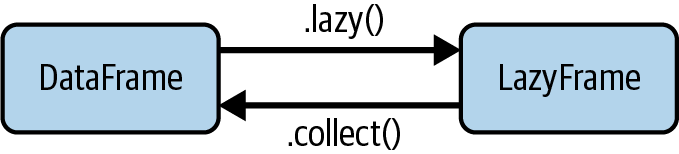
    Janssens and Nieuwdorp (2025) p. 98, Figure 5.1

HW5: No More Shoving SQL in Python with """

  • DuckDB: “Artificial” separation of computation and data
    • HW4 Q3 Data loaded into Pandas DataFrame

    • HW4 Q3 Computation written as SQL expression:

      query = """
      <SQL code>
      """
    • …Then you shoved them together: result_df = con.execute(query).df()

  • Polars: “Natural” computation-data separation within the same language (Python)
    • HW5 Q2 Data loaded into Polars DataFrame (Python object)
    • HW5 Q2 Computation written as Polars functions (Python code)
    • polars library specifies which functions “activate” eager evaluation

A Less-Rushed Introduction to DuckDB

  • DuckDB = “SQLite for OLAP (Columnar Patterns)”
  • SQLite = “DuckDB for OLTP (Row-Based Patterns)”

DuckDB: Buzzwords \(\leadsto\) Understanding

DuckDB is an in-process SQL OLAP DBMS. (Aubury 2024)

  • Database Management System (DBMS): An interface between the database and its users, allowing create, read, update, and delete (CRUD) operations on the DB

  • Online Analytical Processing (OLAP): A data processing paradigm focused on applying column-wise aggregation functions and joining large datasets together

    (Contrasts with Online Transaction Processing (OLTP), where frequent writing of individual records (rows) is the dominant pattern of data interaction)

  • Structured Query Language (SQL): A declarative programming language used to store, manipulate, and query records in relational databases – DBs representing data as tables of rows and columns, with formal relationships defined across tables

  • In-process: DuckDB embeds within a process + its memory. Most DBMSs run separately (e.g., on a remote server); DuckDB eliminates connect/authenticate steps

DuckDB as Ephemeral DB-In-RAM

  • Standalone operation (as its own process, independent of Python): DuckDB CLI

  • Python operation: Upon import duckdb, creates a default, in-memory DB

    default_mem_con = duckdb.connect(database=':default:')
    Typically not used, if only bc less clear where and when the DB was created (readers of your code would need to know this fact about import duckdb)
  • Setting up a connection creates a new, con-specific in-memory DB:

    con = duckdb.connect(database=':memory:')
    con = duckdb.connect() # database=':memory:' is default setting
  • Can persist to file on disk:

    con = duckdb.connect('my_cool_data.duckdb')
  • Please note duckdb.connect() is not how we connect to the on-disk data files, external S3 objects, or in-memory DataFrames that we want to run queries on!

    con.execute('SELECT * FROM my_df LIMIT 5;')

SQLite: “DuckDB for OLTP”

  • Both are simplified in-process DBMSs that connect to a single local file (also both free and open source)
  • SQLite optimized for row-oriented, OLTP workloads
  • DuckDB optimized for column-oriented, OLAP workloads
  • HW6 will give you exposure to both!
    • SQLite for OLTP ingestion of events
    • Athena (coming soon) for “automatic” ETL
    • DuckDB for OLAP inference (MLFlow)

Why Mention SQLite?

  • Next week, when we dive into AWS Athena (Virtuoso et al. 2021), we will be bridging OLTP and OLAP
  • The more “ambidextrous” you can be – comfortable with both row-based and columnar workflows – the better you’ll be at building and debugging \(\text{OLTP} \overset{\text{ETL}}{\longrightarrow} \text{OLAP}\) pipelines!

A Non-Sprinted Introduction to Polars

  • Eager vs. Lazy Evaluation
  • Building Expressions
  • In-Class Demo!

Polars (Jeff’s Mental Model)

  • Polars = DataFrame library in Rust for fast (query-optimized), distributed OLAP workflows
  • polars = DataFrame library in Python, “high-level” (Python-level) “wrapper” around underlying Polars code
  • If we want optimized, distributed processing, we need lazy execution (enabling logical \(\leadsto\) physical query plan)…
  • Query optimization via lazy execution not part of pandas!
  • \(\implies\) Let’s find a lazy-execution-focused library that “feels” as close to Pandas as possible… that’s polars!

pl.DataFrame vs. LazyFrame

  • Polars has two “types” of DataFrames… “Types” in quotes because, a LazyFrame doesn’t actually contain any data!
  • A LazyFrame is a plan (using expressions) for creating a pl.DataFrame
  • Call lf.show_graph() to show Polars’ optimized query plan
  • The special function collect() is what actually executes the plan, materializing the result as a pl.DataFrame

Janssens and Nieuwdorp (2025) p. 98, Figure 5.1

LazyFrames = “Plans” = Strings of Expressions

  • Since we’re in OLAP mode, we’ll almost always be using columns as our core objects
  • \(\implies\) Most Polars expressions involve pl.col():
    • pl.col('*') is the expression «all columns»
    • pl.col(pl.String) is the expression «all string columns»
    • pl.col('Age') is the expression «the column named 'Age'»
    • pl.col('Age') > 20 is the expression «the col named 'Age' is greater than 20»
  • We then use expressions e via predicates:
    • pl.select(e) to keep only columns matching e
    • pl.filter(e) to keep only rows matching e
    • pl.with_columns(e) to create new columns based on e
    • pl.group_by(e).len() to group based on e (then aggregate, here by counting)

Lab Time!

Week 5 Lab: Polars

References