Week 4: Data Gathering and APIs
DSAN 5100: Data Science and Analytics
Section 02
Jeff Jacobs
Tuesday, September 12, 2023
Schedule
Today’s Planned Schedule:
| Start | End | Topic | Recording | |
|---|---|---|---|---|
| Lecture | 3:30pm | 3:40pm | Week 03 Recap → | |
| 3:40pm | 4:00pm | Quiz 2.1 | ||
| 4:00pm | 4:30pm | Data Gathering → | ||
| 4:30pm | 4:45pm | Web Scraping → | ||
| 4:45pm | 5:00pm | APIs → | ||
| Break! | 5:00pm | 5:10pm | ||
| Lab | 5:10pm | 5:50pm | Lab Demonstrations → | |
| 5:50pm | 6:00pm | Lab Assignment Overview → |
Week 03 Recap
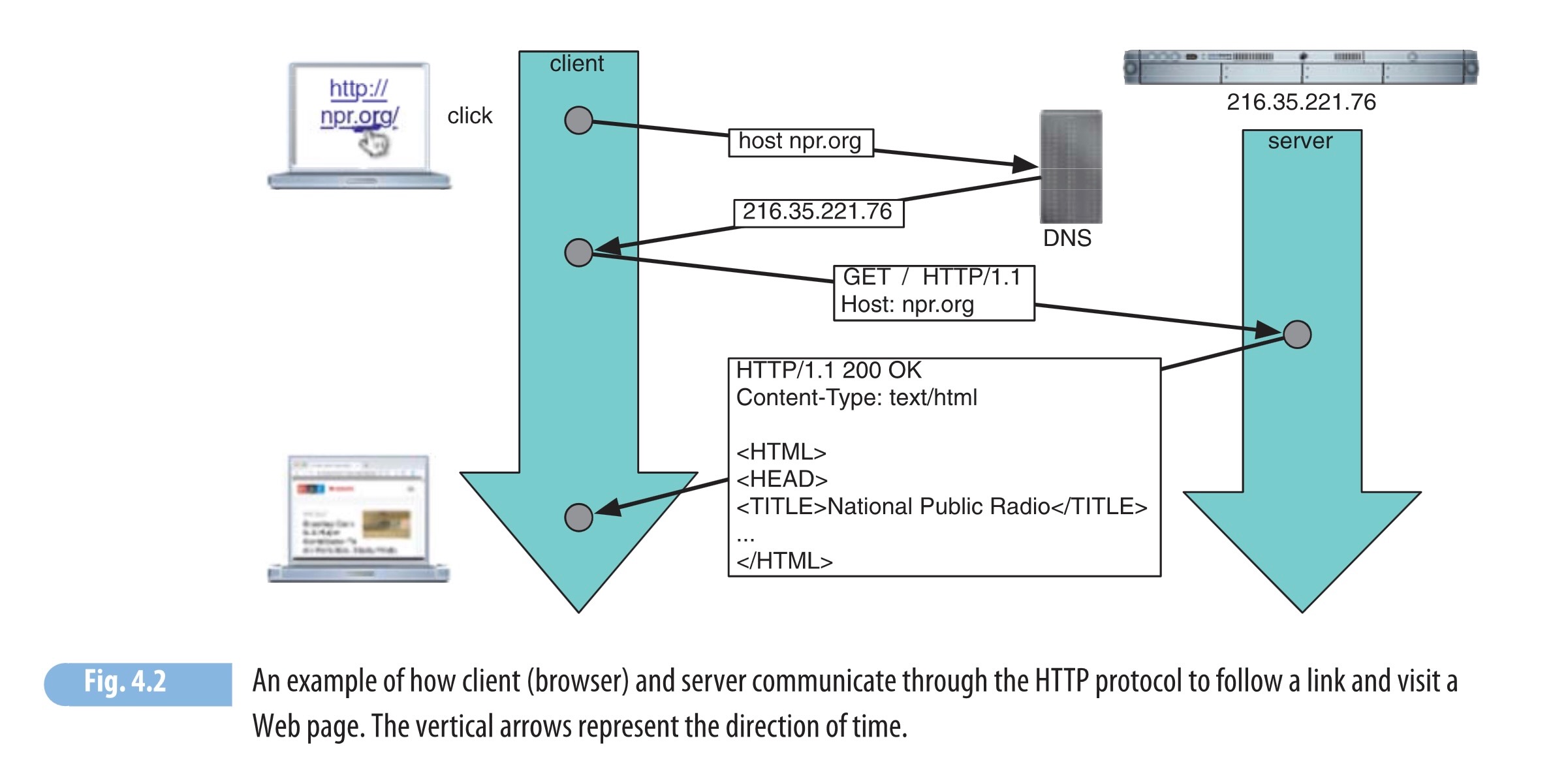
Image from Menczer, Fortunato, and Davis (2020, 90)
Git Commands
| Command | What It Does |
|---|---|
git clone |
Downloads a repo from the web to our local computer |
git init |
Creates a new, blank Git repository on our local computer (configuration/change-tracking stored in .git subfolder) |
git add |
Stages a file(s): Git will now track changes in this file(s) |
git reset |
Undoes a git add |
git status |
Shows currently staged files and their status (created, modified, deleted) |
git commit -m "message" |
“Saves” the current version of all staged files, ready to be pushed to a backup dir or remote server like GitHub |
git push |
Transmits local commits to remote server |
git pull |
Downloads commits from remote server to local computer |
git merge |
Merges remote versions of files with local versions |
Reproducible Docs/Literate Programming
- 1980s: \(\LaTeX\) for \(\widehat{\mathcal{T}}\)ypesetting \(\sqrt{math}^2\)
- 1990s: Python and R as powerful scripting languages (no compilation required)
- 2000s/2010s: Interactive Python via Jupyter, fancy IDE for R called RStudio
- 2020s: Quarto (using pandoc under the hood) enables use of markdown for formatting, \(\LaTeX\) for math, and both Python and R in same document, with choice of output formats (HTML, presentations, Word docs, …)
Quiz Time
Data Gathering
- Preexisting data sources
- Web scraping
- Converting between formats
Preexisting Data Sources
- Depending on your field, or the type of data you’re looking for, there may be a “standard” data source! For example:
- Economics:
- US data: FRED
- Global data: World Bank Open Data, OECD Data, etc.
- Political Science:
- Network Science:
Web Scraping
- Fun fact: you can view a webpage’s HTML source code by right-clicking on the page and selecting “View Source”
- On older websites, this means we can just request page and parse the returned HTML
- Less fun fact: modern web frameworks (React, Next.js) generate pages dynamically using JS, meaning that what you see on the page will not be visible in the HTML source
- Data scraping still possible for these sites! Using browser automation tools like Selenium
Scraping Difficulty
| How is data loaded? | Solution | Example | ||
|---|---|---|---|---|
| 😊 | Easy | Data in HTML source | “View Source” | |
| 😐 | Medium | Data loaded dynamically via API | “View Source”, find API call, scrape programmatically | |
| 😳 | Hard | Data loaded dynamically [internally] via web framework | Use Selenium |
Data Structures: Foundations
Opening Datasets With Your Terminator Glasses On
- What does a row represent?
- What does a column represent?
- What does a value in a cell represent?
- Are there unique identifiers for the objects you care about?

From Raw Data to Clean Data
Data Structures: Simple \(\rightarrow\) Complex
| id | name | |
|---|---|---|
| 0 | K. Desbrow | kd9@dailymail.com |
| 1 | D. Minall | dminall1@wired.com |
| 2 | C. Knight | ck2@microsoft.com |
| 3 | M. McCaffrey | mccaf4@nhs.uk |
| year | month | points |
|---|---|---|
| 2023 | Jan | 65 |
| 2023 | Feb | |
| 2023 | Mar | 42 |
| 2023 | Apr | 11 |
| id | date | rating | num_rides |
|---|---|---|---|
| 0 | 2023-01 | 0.75 | 45 |
| 0 | 2023-02 | 0.89 | 63 |
| 0 | 2023-03 | 0.97 | 7 |
| 1 | 2023-06 | 0.07 | 10 |
| Source | Target | Weight |
|---|---|---|
| IGF2 | IGF1R | 1 |
| IGF1R | TP53 | 2 |
| TP53 | EGFR | 0.5 |
Tabular Data vs. Relational Data
- All of the datasets on the previous slide are tabular
- Databases like SQLite, MySQL, require us to think about relationships within and between tabular datasets
- Imagine you’re creating the backend for a social network. How would you record users and friendships? Your intuition may be record data:
| id | name | friends |
|---|---|---|
| 1 | Purna | [2,3,4] |
| 2 | Jeff | [1,3,4,5,6] |
| 3 | James | [1,2,4,6] |
| 4 | Nakul | [1,2,3] |
| 5 | Dr. Fauci | [2,6] |
| 6 | Pitbull | [2,5] |
Long story short…
- This doesn’t scale
- Extremely inefficient to find whether two users are friends
- Redundant information: Have to store friendship between A and B in both A’s row and B’s row
A Better Approach
- Move the friendship data into its own table!
- This table now represents relational data, (user table still corresponds to records):
| user_id | name |
|---|---|
| 1 | Purna |
| 2 | Jeff |
| 3 | James |
| 4 | Nakul |
| 5 | Dr. Fauci |
| 6 | Pitbull |
| id | friend_1 | friend_2 | id | friend_1 | friend_2 |
|---|---|---|---|---|---|
| 1 | 1 | 2 | 6 | 2 | 5 |
| 2 | 1 | 3 | 7 | 2 | 6 |
| 3 | 1 | 4 | 8 | 3 | 4 |
| 4 | 2 | 3 | 9 | 3 | 6 |
| 5 | 2 | 4 | 10 | 5 | 6 |
- May seem weird in terms of human readability, but think in terms of memory/computational efficiency: (a) Scalable, (b) Easy to find if two users are friends (via sorting/searching algorithms), (c) No redundant info
DBs: Relational or Otherwise
- For rest of lecture we zoom in on cases where data comes as individual files
- But on top of the relational format from previous slide, there are also non-relational database formats, like the document-based format used by e.g. MongoDB1
- In either case, data is spread over many files, so that to obtain a single dataset we use queries.
Data Formats
- The most common formats, for most fields:
.csv: Comma-Separated Values.tsv: Tab-Separated Values.json: JavaScript Object Notation.xls/.xlsx: Excel format.dta: Stata format
.csv / .tsv
👍
my_data.csv
→
- Python:
pd.read_csv()(from Pandas library) - R:
read_csv()(fromreadrlibrary)
.json
- Python:
json(built-in library,import json) - R:
jsonlite(install.packages(jsonlite)) - Helpful validator (for when
.jsonfile won’t load)
Other Formats
Web Scraping
| How is data loaded? | Solution | Example | ||
|---|---|---|---|---|
| This section → | 😊 Easy | Data in HTML source | “View Source” | |
| Next section → | 😐 Medium | Data loaded dynamically via API | “View Source”, find API call, scrape programmatically | |
| Future weeks → | 😳 Hard | Data loaded dynamically [internally] via web framework | Use Selenium |
Scraping HTML with requests and BeautifulSoup
requests Documentation | BeautifulSoup Documentation
Code
# Get HTML
import requests
# Perform request
response = requests.get("https://en.wikipedia.org/wiki/Data_science")
# Parse HTML
from bs4 import BeautifulSoup
soup = BeautifulSoup(response.text, 'html.parser')
all_headers = soup.find_all("h2")
section_headers = [h.find("span", {'class': 'mw-headline'}).text for h in all_headers[1:]]
section_headers
['Foundations', 'Etymology', 'Data Science and Data Analysis', 'History', 'See also', 'References']Navigating HTML with BeautifulSoup
- Let’s focus on this line from the previous slide:
find_all()is the key function for scraping!- If the HTML has a repeating structure (like rows in a table),
find_all()can instantly parse this structure into a Python list.
The Power of find_all()
data_page.html
<div>, <li>)First Dataset
1
2
3
Second Dataset
- 4.0
- 5.5
- 6.7
Parsing HTML Tables
table_data.html
| X1 | X2 | X3 |
|---|---|---|
| 1 | 3 | 5 |
| 2 | 4 | 6 |
APIs
Application Programming Interfaces: developer-facing part of data pipeline/service. Abstracts unnecessary details:
| Example | Care about | Don’t care about |
|---|---|---|
| Electrical outlet | Electricity | Details of Alternating/Direct Currents |
| Water fountain | Water | Details of how it’s pumped into the fountain |
| Car | Accelerate, brake, reverse | Details of combustion engine |
What Does an API Do?
Exposes endpoints for use by developers, without requiring them to know the nuts and bolts of your pipeline/service:
| Example | Endpoint | Not Exposed |
|---|---|---|
| Electrical outlet | Socket | Internal wiring |
| Water fountain | Aerator | Water pump |
| Car | Pedals, Steering wheel, etc. | Engine |
Example: Math API
- Base URL:
https://newton.vercel.app/api/v2/ - The endpoint:
factor - The argument:
"x^2 - 1" - The request:
https://newton.vercel.app/api/v2/factor/x^2-1
Math API Endpoints
| Operation | API Endpoint | Result |
|---|---|---|
| Simplify | /simplify/2^2+2(2) |
8 |
| Factor | /factor/x^2 + 2x |
x (x + 2) |
| Derive | /derive/x^2+2x |
2 x + 2 |
| Integrate | /integrate/x^2+2x |
1/3 x^3 + x^2 + C |
| Find 0’s | /zeroes/x^2+2x |
[-2, 0] |
| Find Tangent | /tangent/2|x^3 |
12 x + -16 |
| Area Under Curve | /area/2:4|x^3 |
60 |
| Cosine | /cos/pi |
-1 |
| Sine | /sin/0 |
0 |
| Tangent | /tan/0 |
0 |
Authentication
- Unlike the math API, most APIs do not allow requests to be made by anonymous requesters, and require authentication.
- For example, you can access public GitHub repos anonymously, but to access private GitHub repos using GitHub’s API, you’ll need to authenticate that you are in fact the one making the request
Authentication via PyGithub
PyGithub Installation
Install using the following terminal/shell command [Documentation]
PyGithub can handle authentication for you. Example: this private repo in my account does not show up unless the request is authenticated (via a Personal Access Token)1:
# Load the access token securely
import dotenv
dotenv.load_dotenv("../.env", override=True)
import os
my_access_token = os.getenv('GITHUB_TOKEN')
import github
# Use the access token to make an API request
auth = github.Auth.Token(my_access_token)
g = github.Github(auth=auth)
g.get_user().get_repo("private-repo-test")Repository(full_name="jpowerj/private-repo-test")Lab Demonstrations
Wikipedia API
Google Scholar API
News API
Lab Assignment Overview
References
Agrawal, Monica, Marinka Zitnik, and Jure Leskovec. 2018. “Large-Scale Analysis of Disease Pathways in the Human Interactome.” In PACIFIC SYMPOSIUM on BIOCOMPUTING 2018: Proceedings of the Pacific Symposium, 111–22. World Scientific.
Menczer, Filippo, Santo Fortunato, and Clayton A. Davis. 2020. A First Course in Network Science. Cambridge University Press.
Appendix: Code Examples in R
Scraping HTML with httr2 and xml2
httr2 Documentation | xml2 Documentation
Code
{xml_nodeset (6)}
[1] <span class="mw-headline" id="Foundations">Foundations</span>
[2] <span class="mw-headline" id="Etymology">Etymology</span>
[3] <span class="mw-headline" id="Data_Science_and_Data_Analysis">Data Scienc ...
[4] <span class="mw-headline" id="History">History</span>
[5] <span class="mw-headline" id="See_also">See also</span>
[6] <span class="mw-headline" id="References">References</span>Navigating HTML with XPath
- Notice the last line on the previous slide:
- The string passed to
xml_find_all()is an XPath selector
XPath I: Selecting Elements
mypage.html
'//div'matches all elements<div>in the document:'//div//img'matches<img>elements which are children of<div>elements:
XPath II: Filtering by Attributes
mypage.html
'//p[id="page-content"]'matches all<p>elements with idpage-content1:Matching classes is a bit trickier:
'//img[contains(concat(" ", normalize-space(@class), " "), " footer-image ")]'matches all
<img>elements withpage-contentas one of their classes2
Example: Math API
- Base URL:
https://newton.vercel.app/api/v2/ - The endpoint:
factor - The argument:
"x^2 - 1" - The request:
https://newton.vercel.app/api/v2/factor/x^2-1
Authentication
- Most APIs don’t allow requests to be made by anonymous requesters, and require authentication.
- For example, to access private GitHub repos using GitHub’s API, you’ll need to authenticate that you are in fact the one making the request
Authentication via GH
- The
GHlibrary forRcan handle this authentication process for you. For example, this private repo in my account does not show up if requested anonymously, but does show up when requested usingGHwith a Personal Access Token1:
Code
private-repo-test: Private repo example for DSAN5000